


Why PIM vs PRM Matters Today
Product Information Management (PIM) and Product Resource Management (PRM) are at the core of digital commerce, but they solve different problems. Product Information Management (PIM) focuses on centralizing, enriching, and distributing customer-facing product data across websites, marketplaces, and channels. PRM is aligned with internal product resources, processes, or documentation. A PIM system becomes the single source of truth for attributes, descriptions, media, and pricing, ensuring consistent catalog management and smooth handoff to your eCommerce, marketplace, and marketing tools.
Differentiation between PIM software and PRM is non-negotiable when you design your tech stack. If you treat PRM as a substitute for a dedicated PIM system, you will end up with poor content quality and disconnected data when you add channels. A deliberate PIM software comparison, with Cloud-based PIM, SaaS PIM, and Enterprise PIM options, including solutions like OdooPIM and other Best PIM solutions, shows which platform supports your product experience and which belongs in a different layer.
Understanding the distinction between PIM and PRM stops teams from buying overlapping tools that do half the job each. When done right, investing in the Best PIM software for small businesses or an enterprise-grade platform delivers clean data, efficient catalog management, and a scalable foundation.
What Is Product Information Management (PIM)?
Product Information Management (PIM) is the discipline and technology used to centralize, organize, and control all product-related data in one place. A PIM system becomes the single hub for titles, descriptions, attributes, technical specs, images, videos, documents, and pricing, instead of scattering them across spreadsheets, ERPs, and individual teams. Product Information Management (PIM) ensures that customer-facing touchpoints pull from the same structured dataset, for a consistent buying experience.
PIM software handles four core functions extremely well: data ingestion, enrichment, validation, and syndication. It pulls information from multiple sources (suppliers, ERPs, legacy tools), enriches content and media, runs validation rules to catch missing or broken fields, syndicates channel-ready data to websites, marketplaces, apps, and print. The Best PIM solutions automate these workflows, so teams spend less time fixing errors. Whether you use Cloud-based PIM, SaaS PIM, or Enterprise PIM, the goal stays the same, clean, complete, and reusable product data.
In the broader digital ecosystem, a PIM system sits between your back-office systems and your customer-facing channels. It connects to ERP and warehouse tools upstream, then feeds eCommerce platforms, marketplace integrations, and marketing systems downstream. This makes PIM the backbone of omnichannel catalog management. A PIM software comparison, including options like OdooPIM and the Best PIM software for small businesses, helps you choose a platform that fits your current stack and growth.

What Is Product Resource Management (PRM)?
Product Resource Management (PRM) refers to tools and approaches used to organize and control the resources connected to products, such as content assets, internal tasks, teams, and processes, rather than the full commercial product record itself. Depending on the vendor, PRM may describe systems that coordinate product-related workflows, manage operational resources, or handle product content elements like images, videos, and documents. In organizations, PRM lives closer to internal execution: it helps align people, responsibilities, and operational resources required to bring products to market efficiently.
The core focus of PRM is operational: managing product resources, internal workflows, and planning activities across departments such as product, operations, and marketing support. It helps schedule work, route tasks, and ensure the right teams touch the right items at the right time. That makes PRM a useful complement to Product Information Management (PIM), but not a substitute. A dedicated PIM system remains the authoritative hub for structured product data, titles, attributes, relationships, pricing, and channel-ready content. PRM supports the people and processes around that information.
In a stack, the two work side by side: PIM software (including Cloud-based PIM, SaaS PIM, Enterprise PIM, or options like OdooPIM) maintains clean, reusable data for omnichannel catalog management, and PRM helps coordinate the operational resources needed to maintain and use that data at scale. When you do a PIM software comparison or shortlist the Best PIM solutions and the Best PIM software for small businesses, you still find PRM as an adjacent concept, not the system of record for product information.
PIM vs PRM: Conceptual Differences
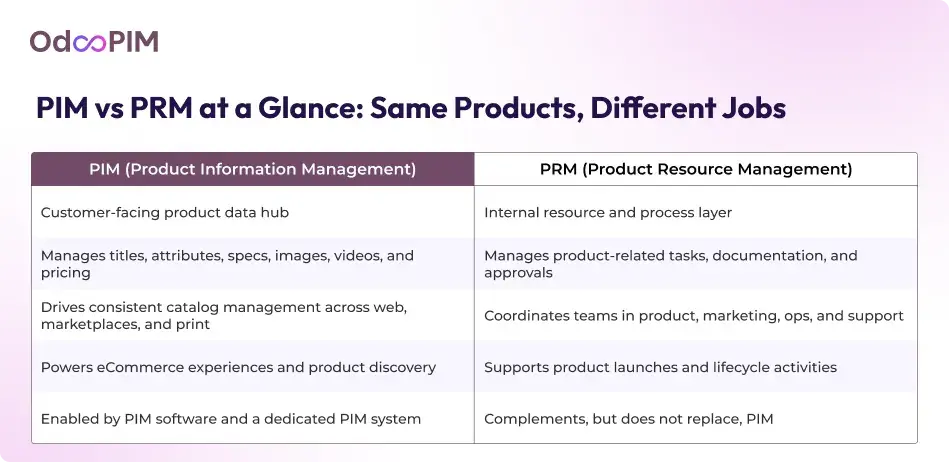
Product Information Management (PIM) and Product Resource Management (PRM) are located in different layers of your stack and solve different problems. A PIM system acts as the customer-facing data hub, owning structured product information such as names, attributes, specs, media, and pricing that flows into eCommerce sites, marketplaces, catalogs, and marketing campaigns. PIM software exists to make product data accurate, rich, and consistent where buyers see it, which is why the Best PIM solutions, from Cloud-based PIM and SaaS PIM to Enterprise PIM platforms like OdooPIM, are designed around catalog management, validation, and omnichannel publishing.
PRM is internal and process-centric. It helps teams manage product-related resources, tasks, and workflows, who needs to update which assets, when reviews happen, how approvals move, and which internal documentation supports each product. PRM coordinates the work around products; PIM owns the data that work produces. Think of PRM as the operational layer that keeps internal processes on track, Product Information Management (PIM) ensures the result of those processes shows up consistently in customer touchpoints.
In practice, PIM is the right choice when there is inconsistent product data across channels. If you struggle with mismatched descriptions on your site and marketplaces, slow onboarding of new SKUs, and repeated manual updates, you solve that with a dedicated PIM system, starting with the Best PIM software for small businesses or scaling into Enterprise PIM as your assortment and markets grow. PRM adds value when coordination is the bottleneck: managing busy content teams, handling complex review cycles, or orchestrating stakeholders in product launches. A smart PIM software comparison should treat PRM as a complementary layer: invest in PIM first to fix product information, then add PRM if process complexity becomes a limitation.
PIM System Capabilities in Detail
A Product Information Management (PIM) system offers a single, structured place to control product data. A unified catalog management approach eliminates conflicting versions of the truth and gives merchandising, marketing, and ecommerce teams one authoritative record for SKU.
Atop this central repository, Product Information Management (PIM) adds data enrichment capabilities. You define and manage attributes that match how customers search and buy, dimensions, materials, compatibility, regulatory info, and attach rich media such as images, videos, PDFs, and manuals so products are ready to sell, not just list. Validation rules and completeness scores ensure products meet internal standards before they go live, which is why the Best PIM solutions dramatically cut errors and “empty” product pages that hurt conversion.
A key strength of a PIM system is how easily it produces channel-ready exports. Instead of creating separate versions of product data for each storefront or marketplace, you configure channel templates and let the PIM software for eCommerce platforms, marketplaces, print catalogs, and partner portals. That means you can push optimized data to your online store, marketplaces, and offline channels from the same source, still respecting each destination’s requirements for fields, formats, and taxonomy. This is where Cloud-based PIM and SaaS PIM shine: they handle complex mappings without heavy custom development.
The Best PIM solutions are built for product volume and organizational complexity. Enterprise PIM platforms and advanced options like OdooPIM support role-based permissions, localized catalogs for different regions, and workflows that let copywriters, product managers, and translators collaborate without stepping on each other’s work. Even the Best PIM software for small businesses benefits from these foundations, because as the team grows or expands into new markets, the same PIM system keeps pace. A PIM software comparison should always look at how well each platform handles multi-language content, regional assortments, and cross-team workflows.
Product Resource Management (PRM) Capabilities in Detail
Product Resource Management (PRM) tools focus on the operational side of products rather than on commercial, customer-facing information. They handle internal resource tracking, product-related assets, documentation, and workflows. PRM may manage internal documents, technical packs, engineering resources, or project tasks connected to product development, launches, or updates, acting as an internal control layer rather than the public-facing product backbone that Product Information Management (PIM) provides.
Because of this operational focus, PRM links tightly into product development, operations, and support processes. It can connect to PLM, project management, or internal portals to coordinate engineering changes, supplier inputs, or support documentation throughout the product lifecycle. PRM helps orchestrate people and time, routing work, tracking status, and ensuring the right teams access the right internal resources, a PIM system governs the structured product data that appears in eCommerce, catalogs, and downstream systems.
PRM becomes problematic when organizations try to use it as a substitute for PIM software in customer-facing product data scenarios. PRM setups lack the robust data modeling, enrichment, validation, and channel-specific export capabilities that Best PIM solutions deliver for omnichannel catalog management. It rarely support advanced syndication to web stores, marketplaces, and print, or the governance required for clean, reusable product records across channels. This is why a serious PIM software comparison should treat PRM as complementary: you rely on Cloud-based PIM, SaaS PIM, Enterprise PIM, or platforms like OdooPIM to own product data and serve it outward, and you use PRM to manage the internal resources and workflows that support that data.
Architecture: Where PIM and PRM Sit in Your Stack
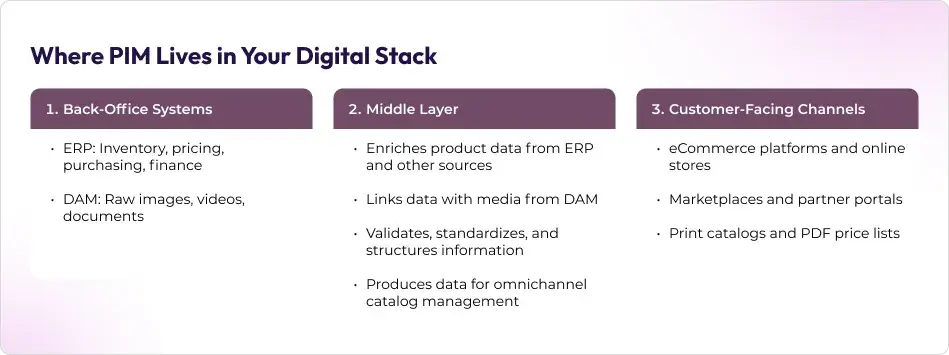
In a digital commerce stack, an ERP manages core business operations like inventory, purchasing, and finance. DAM stores and serves raw digital assets, such as images, videos, documents. A PIM system sits between these back-office tools and your eCommerce platforms, marketplaces, and print channels as the product data brain. PRM, by contrast, operates alongside them on the internal side, handling product-related resources, tasks, and workflows.
PIM software pulls product data from ERP and other sources, links it with assets from the DAM, enriches and validates it, then pushes clean, structured information into storefronts, feeds, and catalogs. PRM plugs into internal tools such as PLM, project management, or ticketing systems to coordinate who works on which product tasks, manage documentation, and track internal progress. This makes Product Information Management (PIM) the outward-facing truth for catalog management, PRM supports the people and processes that keep products moving inside the organization.
Separating Product Information Management (PIM) from Product Resource Management keeps your architecture understandable and reduces complexity. When you let a dedicated PIM system, be it a Cloud-based PIM, SaaS PIM, Enterprise PIM, or a solution like OdooPIM, own customer-facing data, you avoid duplicate fields, conflicting sources, and brittle workarounds in PRM and other tools.

Types of PIM Solutions: Cloud-Based, SaaS, and Enterprise PIM
Cloud-based PIM and SaaS PIM solutions give businesses a fast, low-friction way to implement Product Information Management (PIM) without heavy infrastructure or long IT projects. These PIM systems allows users to get automatic updates, built-in security, and easy access for distributed teams. They are ideal when you want to centralize product data, enrich content, and syndicate it to eCommerce platforms and marketplaces without building and maintaining servers. For organizations in mid-growth, Cloud-based PIM and SaaS PIM options represent the Best PIM solutions for total cost of ownership.
Enterprise PIM platforms serve large organizations with complex, multi-brand, multi-region catalogs and strict governance requirements. These solutions support advanced data models, localization across dozens of markets, intricate workflows, and integration with ERP, DAM, PLM, and multiple storefronts. Enterprise PIM focuses on control and scalability, ensuring that thousands or millions of SKUs stay accurate across channels and teams. In a PIM software comparison, you review how each Enterprise PIM handles versioning, roles and permissions, and cross-business-unit collaboration at scale.
OdooPIM fits into this landscape as a flexible PIM solution within the broader Odoo ecosystem. It combines the accessibility of Cloud-based PIM with the extensibility expected from a modular business suite, connecting naturally to Odoo ERP, eCommerce, inventory, and marketing apps. That makes OdooPIM attractive as one of the Best PIM software for small businesses getting started with structured product data and as a solid choice for growing companies that need tighter integration across finance, operations, and digital channels. When you evaluate PIM software, OdooPIM deserves a place on the shortlist for organizations that want Product Information Management (PIM) aligned natively with the rest of their business stack.
Learn about OdooPIM vs. Traditional PIM Platforms.
PIM Software Comparison: Key Evaluation Criteria
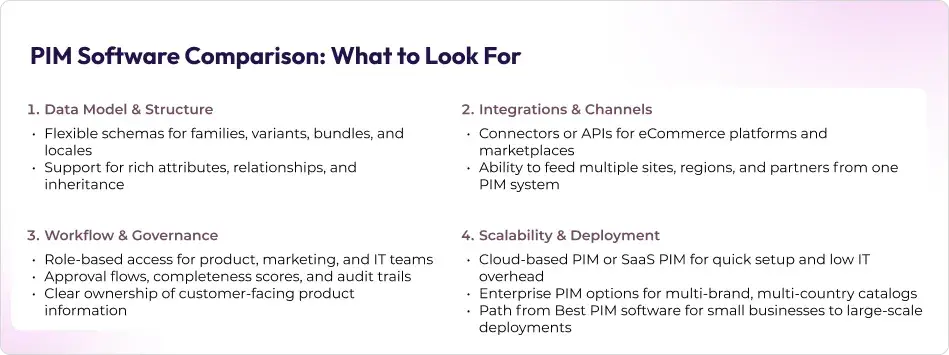
A smart PIM software comparison starts with the data model. Product Information Management (PIM) only works if the system can handle your real-world complexity, such as families, variants, bundles, regional assortments, and custom attributes, not just a flat table. Look for PIM software with flexible schemas, support for relationships between products, and validation rules. The Best PIM solutions let you adapt the model as your catalog grows without ripping out what you built earlier.
Next, evaluate multichannel and marketplace integrations. Your PIM must talk fluently to eCommerce platforms, marketplaces, and any channels you add. Check for native or prebuilt connectors, robust APIs, and mapping tools that handle each channel’s required attributes and formats. Integration capability is non-negotiable if you want Cloud-based PIM, SaaS PIM, or Enterprise PIM to drive consistent catalog management across web, marketplaces, and print without constant IT intervention.
Workflow, governance, and user roles decide whether teams trust and use the system. Prioritize PIM software that offers role-based permissions, approval flows, completeness scoring, and audit trails, so you always know who changed what and when. This is where the Best PIM software for small businesses and enterprise-grade platforms like OdooPIM are apart from PRM tools: PIM is built to enforce product data quality and ownership, not just move tasks around.
To run a practical PIM software comparison, start by mapping your catalog size, channel mix, and team structure. Shortlist a few Best PIM solutions, such as Cloud-based PIM, SaaS PIM, and Enterprise PIM options and test them with a real subset of your data and channels. Validate how each PIM system handles your schema, connects to your stack, supports workflows, and scales with your roadmap.
Best PIM Software for Small Businesses vs Enterprise Needs
The best PIM software for small businesses is a SaaS PIM with a clean interface, quick onboarding, and minimal IT overhead. Product Information Management (PIM) should remove friction and cloud-based OdooPIM works on this count. You get a PIM system that connects to your eCommerce stack without a long, expensive implementation. OdooPIM lets lean teams fix messy product information fast and focus on campaigns and sales instead of spreadsheets.
As operations mature, a business reaches a point where Enterprise PIM becomes necessary. OdooPIM scales well to large, complex environments. It features include multi-country catalogs with localized content, advanced attribute models, multiple business units, and stricter governance needs. Users also gain access to features such as granular roles and permissions, region catalogs, and integration with ERP, DAM, and multiple storefronts.
Companies start with PRM-like tools or generic project systems to manage product-related resources and quickly hit a ceiling. PRM can coordinate internal work, but it cannot replace dedicated PIM software as the single source of truth for customer-facing product data. As soon as you manage several channels, large SKUs, or several regions, you outgrow PRM-only setups and need full-featured Product Information Management (PIM) for catalog management. Moving to one of the Best PIM solutions, ideally a Cloud-based PIM or SaaS PIM that can evolve into Enterprise PIM, gives users an opportunity to start with a few features and scale to advanced capabilities.

Real-World Scenarios: When You Need PIM, PRM, or Both
Scenario 1:
A growing eCommerce brand selling on its own site, Amazon, and maybe a marketplace or two, needs clean, consistent product data than anything else. Product names, images, attributes, and prices must line up across channels or customers lose trust and conversion drops. In this case, you take a PIM‑first approach: implement Product Information Management (PIM) to centralize data, standardize attributes, and automate feeds into each storefront. Cloud-based PIM or SaaS PIM, one of the Best PIM software for small businesses, such as OdooPIM, gives you fast deployment and quick wins without heavy IT effort.
Scenario 2:
A manufacturing or B2B company tends to juggle technical documentation, internal specs, certifications, and long product development cycles across engineering, quality, and sales. Here a PRM along with a PIM is the right combination. PRM coordinates internal resources, technical docs, and workflows, and a PIM system manages the structured product information that goes to distributors, portals, and eCommerce frontends. You use PIM software to keep external data accurate and PRM to keep internal processes and product resources aligned, which is exactly where an OdooPIM instance complements PRM tools.
Scenario 3:
In a hybrid model, the PIM system powers all external content, and PRM supports the internal product lifecycle end to end. Product Information Management (PIM) serves as the outward-facing source of truth, feeding websites, catalogs, partners, and marketplaces. PRM orchestrates tasks like content creation, translations, approvals, and technical updates behind the scenes. This setup works well for brands scaling globally: one of the Best PIM solutions (Cloud-based PIM, SaaS PIM, or Enterprise PIM) handles channel-ready data, and PRM ensures the right people, assets, and processes stay in sync. A thoughtful PIM software comparison helps you decide which PIM software anchors this ecosystem PRM plays a clearly defined supporting role.
Learn more about PIM for fashion industry.
How OdooPIM Bridges Gaps in Product Data Management
OdooPIM bridges the gap between scattered product data and the operational power of an integrated business suite. As a Cloud-based PIM and SaaS PIM option, it runs alongside Odoo’s ERP, CRM, eCommerce, and inventory apps, turning Product Information Management (PIM) into a native part of your environment rather than another disconnected tool. Product details, attributes, variants, media, and pricing live in one PIM system, then flow automatically into Odoo modules that handle orders, stock, and customer interactions. This makes OdooPIM a contender when you evaluate Best PIM solutions for teams that already rely on Odoo.
Where PRM focuses on coordinating internal work, OdooPIM directly solves the product data problem. It centralizes and enriches information, supports robust catalog management for thousands of SKUs, and syndicates channel-ready content to web stores and marketplaces through Odoo’s integrations. You manage attributes, categories, translations, media, and channel nuances once, then push consistent data, beyond what PRM alone can deliver for customer-facing content. In practice, OdooPIM and Odoo ERP together provide an end-to-end flow: PIM software owns the product truth, ERP and eCommerce apps execute sales, logistics, and customer experience.
OdooPIM scales from small to enterprise use cases. For teams that need the Best PIM software for small businesses, its SaaS delivery, familiar Odoo UI, and quick setup lower the barrier to adopting Product Information Management (PIM) without heavy IT work. As catalogs, channels, and regions grow, the same platform evolves into an Enterprise PIM setup with advanced workflows, multi-language and multi-country catalogs, and marketplace feeds managed through Odoo connectors like those for Amazon, eBay, and major eCommerce platforms. In a serious PIM software comparison, that flexibility, one PIM system that can start simple, live inside your core business apps, and grow into a central hub for product data management, makes OdooPIM a compelling choice.
Making the Right Choice: PIM, PRM, or Both?
Choosing between PIM, PRM, or both starts with a simple question: is your problem messy product data or messy internal processes? If product names, attributes, images, and prices are inconsistent across your website, marketplaces, and catalogs, you need Product Information Management (PIM) first. Then, you can still add PRM to manage internal workflows, tasks, and documentation around those products.
Aligning your Product Information Management (PIM) and Product Resource Management strategies is what future-proofs your digital operations. You let Cloud-based PIM, SaaS PIM, or Enterprise PIM solutions own customer-facing product data, PRM coordinates the people and processes that support it. That clear separation prevents duplicate fields, conflicting versions, and fragile integrations as your stack grows. A thoughtful PIM software comparison helps you select the Best PIM software scale as you grow, so your PIM system remains the stable backbone even as channels, regions, and teams expand.
Frequently Asked Questions
1. What is the main difference between Product Information Management (PIM) and Product Resource Management (PRM)?
The main difference between Product Information Management (PIM) and Product Resource Management (PRM) lies in what they manage and who they serve. Product Information Management (PIM) focuses on customer-facing product data—titles, attributes, specs, images, videos, documents, pricing, and relationships between products. A PIM system exists to keep this information accurate, enriched, and consistent, then push it out to eCommerce sites, marketplaces, print catalogs, and partner channels. It is the engine behind clean catalog management, multichannel publishing, and product experiences online and offline.
Product Resource Management, on the other hand, is about the internal side of product work. PRM centers on product-related resources, documentation, and workflows, who needs to update which content, how internal tasks move through review and approval, and how teams coordinate around launches or technical changes. Where PIM software owns the master record for product data, PRM organizes the people, processes, and internal assets that support that data. The two are complementary: PIM feeds channels with trusted information, PRM ensures the organization behind the scenes runs smoothly and on time.
2. When should a business prioritize PIM software over PRM?
A business should prioritize PIM software over PRM as soon as inconsistent product data starts to impact the customer experience or operational efficiency. If you see different prices or descriptions for the same item across your website and marketplaces, if launching new SKUs takes weeks because data sits in scattered spreadsheets, or if teams spend more time fixing errors than improving content, you need Product Information Management (PIM) first. Implementing one of the Best PIM solutions—whether Cloud-based PIM, SaaS PIM, or an integrated option like OdooPIM—gives you a single source of truth that stabilizes your product information and supports reliable catalog management across channels.
PRM becomes a second step once the product data foundation is in place. After a PIM system is running smoothly, you can introduce PRM to refine internal workflows, documentation, and cross-team coordination. This sequence matters: PRM alone cannot fix bad data being sent to eCommerce and marketplaces, but a solid PIM implementation can. In any serious PIM software comparison, especially when choosing the Best PIM software for small businesses or planning for Enterprise PIM, prioritize tools that solve product data problems first, then layer PRM or project tools on top to streamline how your teams work around that trusted data.
3. Can small businesses rely on PRM tools instead of a PIM system?
Small businesses cannot rely on PRM tools as a long-term substitute for a PIM system. PRM helps organize internal product resources, tasks, and documentation, but it does not give you the structured, channel-ready product data that Product Information Management (PIM) delivers. As soon as you sell on several channels, or manage more than a simple, static catalog—you need centralized, validated information that flows reliably into your website, marketplaces, and feeds. That is the role of PIM software, not PRM.
4. How do I compare Best PIM solutions against PRM in a PIM software comparison?
The Best PIM software for small businesses is Cloud-based PIM or SaaS PIM because these options are quick to deploy, affordable, and easy for non-technical teams to use. They provide a controlled data model, attribute management, validation rules, and automated syndication that PRM cannot match. A PIM system like OdooPIM or other Best PIM solutions will handle catalog management, enrichment, and exports, any PRM or project tools you use remain focused on internal workflows and assets—not on owning the product truth.
In a serious PIM software comparison, you evaluate PIM and PRM against different criteria because they play different roles. For Product Information Management (PIM), you examine data model flexibility (families, variants, bundles), support for complex attributes, and how easily the PIM system adapts as your catalog grows. You look hard at integrations with eCommerce platforms, marketplaces, and other endpoints to confirm that PIM software can drive catalog management and updates at scale.
Workflows, governance, and user roles are another key dimension for PIM: the Best PIM solutions let you define ownership, approvals, and permissions so customer-facing information stays accurate and controlled. PRM is then judged on how well it supports internal resource planning, task routing, and product-related processes, not on whether it can feed your channels. PIM must own the customer-facing record—whether you choose Cloud-based PIM, Enterprise PIM, SaaS PIM, or an integrated option like OdooPIM, PRM sits alongside it as a complementary layer, never as a replacement.
5. Where does OdooPIM fit between PIM and PRM strategies?
OdooPIM fits squarely on the Product Information Management (PIM) side of your strategy playing nicely with PRM and other internal tools. It works as dedicated PIM software inside the broader Odoo ecosystem, integrating natively with Odoo ERP, eCommerce, inventory, and marketing apps to centralize, enrich, and distribute product data. That means OdooPIM becomes the PIM system of record for titles, attributes, variants, media, and pricing, then feeds that clean data into storefronts, marketplaces, and other external channels. PRM or project tools can run in parallel to manage tasks, documentation, and internal workflows, but they do not need to own product information itself.
This separation lets you design a clear architecture: OdooPIM and other Best PIM solutions handle catalog management and channel-ready content, PRM coordinates people and processes around that content. In a PIM software comparison, OdooPIM is attractive because it combines Cloud-based PIM and SaaS PIM convenience with tight ERP and eCommerce integration. You can start with it as one of the Best PIM software for small businesses using Odoo, then extend it into a advanced Enterprise PIM setup as catalogs, teams, and channels grow, keeping PRM focused on orchestration rather than data storage.
6. Do enterprises need Enterprise PIM and PRM, or will one system suffice?
Enterprises that manage multi-brand, multi-country catalogs always need Enterprise PIM in addition to PRM or similar workflow tools. Product Information Management (PIM) is responsible for controlling product data at scale—handling complex hierarchies, localized attributes, translations, and channel requirements across hundreds of thousands of SKUs. Enterprise PIM, Cloud-based PIM, or robust SaaS PIM platforms are built for this level of catalog management, ensuring regions and brands use consistent, validated information. PRM cannot replace this function because it is not designed as a structured product data hub.
What PRM does well is orchestrate complex internal processes: coordinating teams, documents, and resources involved in product development, onboarding, and launch cycles. The Best PIM solutions—whether OdooPIM or another Enterprise PIM—store and syndicate product information; PRM keeps the organization aligned around that information. In practice, one system rarely suffices for roles without compromise. A realistic PIM software comparison for enterprises should assume you need: a PIM system to own customer-facing data and a PRM or workflow layer to manage the internal work that surrounds it.
