
How to export products from shopify
To export products from Shopify, go to Products and click the Export button near the top of the page.
You can choose to export all of the products or just the ones you have selected, and then decide whether you want your export in CSV or Excel format.
The details provided in the export include the SKU, price, inventory level, and images, and these can be used for creating backups or for carrying out bulk editing.
A Shopify PIM such as OdooPIM can be used to simplify the export of product information and speed up updates to the data when required, with only a small amount of manual work. Your team will then be able to reduce the time needed from several hours down to just a few minutes.
Learn about How to Hide Products in Shopify: Easy Steps | OdooPIM
Related article
View all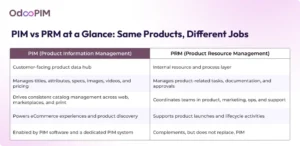
What is the Difference between a PIM and Product Resource Management (PRM)
December 15, 2025Discover the difference between PIM and PRM systems. Learn how Product Information Management and Product Resource Management help businesses centralize product...

What Is a PIM Database? A Complete Guide for Growing Businesses
May 25, 2026A PIM database centralizes all your product data in one place. Learn what it is, how it works, and why growing businesses need it — plus how OdooPIM can help.

PIM Benefits: 12 Measurable Gains for Ecommerce Teams
August 25, 2026Discover 12 measurable PIM benefits for ecommerce teams, from better product data quality and faster time-to-market to improved productivity, conversions, and s...