What Is a PIM System?
A Product Information Management (PIM) system centralizes, enriches, and distributes product data across every sales channel, your website, Amazon, Google Shopping, and retail partners. The ERP vs PIM distinction is critical: an ERP manages transactions like inventory and orders, while a PIM manages product content like descriptions, images, and specifications. PIM and ERP integration ensures that your ERP’s clean transactional data feeds into your PIM for enrichment, then flows to channels. The difference between PIM and ERP comes down to purpose: ERP answers “how many do we have?”, PIM answers “why should someone buy it?” If you’re asking if I need PIM if I have ERP, the answer is yes, ERP product data management covers basics, but you need PIM for storytelling and channel syndication.
Core Functions of a PIM System
A PIM system centralizes product data from multiple sources into one master record, eliminating the version conflicts and reconciliation work that plague spreadsheets. ERP vs PIM comparison shows that while your ERP holds basic identifiers like SKU and cost, the PIM adds enrichment, validation, and syndication capabilities that ERPs lack. Product information management vs ERP is not a competition, both serve essential but different roles. The PIM enriches and distributes. The ERP transacts and tracks.
The second core function is syndication. A PIM pushes product data to the sales channels automatically, your website, Amazon, Google Shopping, and retail partners, with channel-specific formatting. PIM and ERP integration ensures that inventory changes in your ERP flow through the PIM to all channels simultaneously. The third function is governance. Role-based permissions, approval workflows, and audit trails ensure that only approved data reaches customers. Difference between PIM and ERP in governance: ERPs control who can edit costs and inventory. PIMs control who can edit descriptions, images, and compliance copy.
Learn about product lifecycle management.
What Kind of Product Data Does PIM Manage?
A PIM manages three categories of product data. Core attributes include SKU, GTIN, name, description, price, weight, dimensions, and inventory levels, basic identifiers that often originate in your ERP. ERP product data management covers these basics but stops there. Enriched content adds SEO metadata, lifestyle images, video references, comparison charts, technical manuals, and customer reviews. This is where product information management vs ERP becomes clear. ERPs cannot handle rich media or SEO fields.
Relationship data completes the picture. A PIM manages variant matrices (a shirt in three sizes and four colors), compatibility links (which accessories work with which products), and channel mappings (how master fields transform for each destination). Do I need PIM if I have ERP? It becomes obvious when you need to manage these relationships. Your ERP knows you have a shirt in size medium, color blue. Your PIM knows that medium blue shirt goes with which belt and maps to Amazon’s bullet point format. Two different systems and two different jobs.
Learn about product data management software.
In 2026, PIM will be a defining differentiator for digital leaders. Strong product data governance doesn’t just enable AI — it multiplies its value.
– Forrester
Who Uses a PIM System?
Marketing teams use PIM to write SEO descriptions, upload lifestyle images, and manage channel-specific copy without touching technical fields. ERP vs PIM in daily use: marketers never log into the ERP. They live in the PIM. Operations teams use PIM to verify specifications, update dimensions, and ensure supplier data meets quality standards. PIM and ERP integration means operations can pull basic identifiers from the ERP and enrich them in the PIM without double entry.
Sales and merchandising teams use PIM to manage channel pricing, customer-specific assortments, and B2B catalogs. Difference between PIM and ERP for sales: ERP holds standard pricing. PIM holds channel-specific variants. Executive and governance roles use PIM dashboards to monitor data quality, approval completion rates, and channel syndication status. Product information management vs ERP in reporting: ERPs report on financials and inventory. PIMs report on content completeness, validation failures, and digital shelf performance. Do I need PIM if I have ERP depends on whether your product data touches multiple channels or requires rich content.
What Is an ERP System?
An ERP manages daily business operations, inventory, orders, accounting, procurement, in one database, tracking what you have, where it is, and what it costs. ERP vs PIM distinction is clear: ERPs are built for internal operations teams, storing data in tables optimized for transactions, not customer-facing storytelling. Your ERP knows you have 500 units of SKU 12345 at $8.50 each, answering operational questions. Product information management vs ERP reveals that PIM answers customer-facing questions about product features and benefits. Do I need PIM if I have ERP depending on your business model, but if you sell online or through multiple channels, the answer is almost always yes, your ERP handles the back end, but you need a PIM for the front end.

Core Functions of an ERP System
An ERP manages inventory in real time. When a warehouse worker scans a barcode, the system updates stock levels, triggers reorder points, and adjusts accounting ledgers simultaneously. ERP product data management includes basic product identifiers: SKU, name, cost, weight, dimensions, and supplier information. The ERP knows how much you paid and who you bought it from. ERP vs PIM in inventory management: ERP tracks quantities. PIM describes products. You need both for complete product operations.
An ERP also handles financials, general ledger, accounts payable, accounts receivable, and procurement: purchase orders, supplier management, and receiving. The system integrates order management, from quote to cash, including invoicing and payment reconciliation. PIM vs ERP in the order lifecycle: ERP processes the transaction. PIM ensures the customer sees accurate product information during the buying process. PIM and ERP integration connects these two worlds, so inventory updates in the ERP trigger channel updates from the PIM.
How ERP Handles Product Data
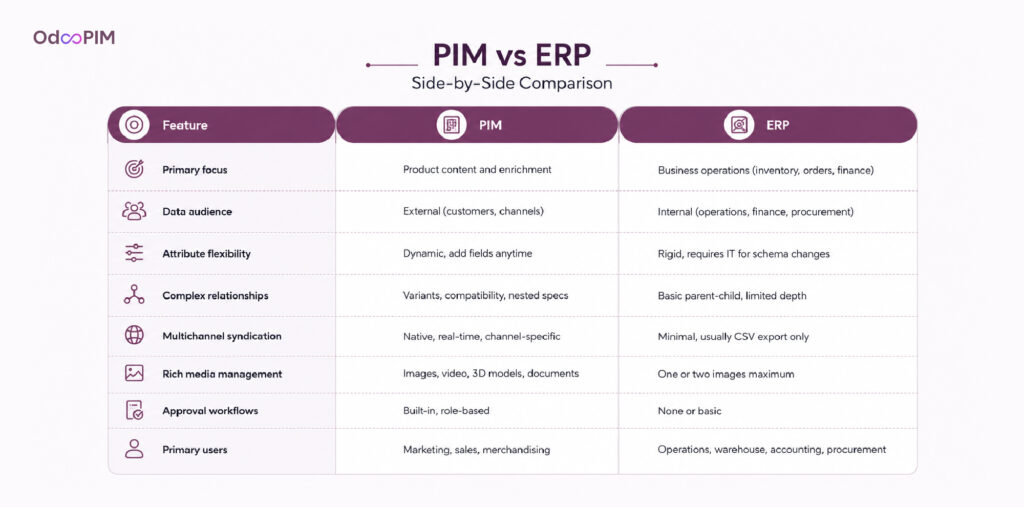
An ERP stores product data in structured tables optimized for transactions. Each product has a record with fields for SKU, name, cost, list price, weight, dimensions, and default supplier. ERP product data management excels at consistency and accuracy for these operational fields. The ERP enforces that every product has a SKU, cost, and inventory tracking method. Difference between PIM and ERP in data structure: ERP uses flat tables and PIM uses nested hierarchies, variant matrices, and relationship links.
What ERPs cannot handle well is enrichment. Product descriptions in an ERP are typically short, transactional notes, not SEO-optimized marketing copy. ERP vs PIM for images: ERPs might store one product photo. PIMs manage lifestyle shots, 360-degree views, and video. Do I need PIM if I have ERP? It becomes obvious when you need to manage rich product content. Your ERP knows a shirt costs $29 and weighs 0.5 pounds. Your PIM knows it is 100% cotton, machine washable, and looks great with the matching belt.
Who Uses an ERP System?
Warehouse staff update inventory, pick and pack orders, and manage receiving. Procurement specialists create purchase orders, track supplier performance, and manage reorder points. ERP vs PIM in daily users: operations teams rarely touch the PIM. They need transactional data, not marketing copy. Accounting and finance teams use the ERP for general ledger, accounts payable, receivables, and financial reporting. Product information management vs ERP for finance: the ERP holds cost data and the PIM holds retail pricing and channel-specific variants.
Sales and customer service teams access the ERP to check inventory, process orders, and manage returns. PIM and ERP integration benefits these users by providing accurate product information alongside transactional data. Executive and management roles use ERP dashboards for financial performance, inventory turnover, and operational KPIs. Difference between PIM and ERP in reporting: ERP reports on operational efficiency. PIM reports on content quality and digital shelf performance. Do I need PIM if I have ERP for executive teams: yes, if your product data touches customers. Your ERP keeps the business running and your PIM helps it grow.
Learn about PIM tools.

PIM vs ERP: Key Differences Explained
Data Focus: Product-Centric vs Business-Wide
A PIM vs ERP comparison starts with data scope. ERP focuses on business-wide operations: inventory, orders, accounting, procurement, and HR across your entire organization. Product information management vs ERP shows that PIM focuses exclusively on product data, descriptions, images, specifications, and channel content. Your ERP knows you have 500 units of SKU 12345. Your PIM knows why a customer should buy it. The difference between PIM and ERP in data focus is fundamental. One is operational and the other is experiential.
An ERP manages data for internal decision-making. Purchase orders, financial statements, and inventory reports help your team run the business. ERP vs PIM in data audience: ERPs serve operations, finance, and procurement. PIM serves marketing, sales, and customer experience teams. ERP product data management covers basics like cost and weight. PIM adds SEO metadata, lifestyle images, and channel-specific copy. Do I need PIM if I have ERP depends on whether your product data needs to persuade customers, not just track inventory.
Internal vs External Data Management
ERP systems manage internal operational data: how many units in the warehouse, what suppliers charge, what customers owe. This data rarely touches customers directly. PIM vs ERP in data visibility: ERPs are back-office systems. PIMs are front-office systems that feed customer-facing channels. Product information management vs ERP means one faces inward (ERP), the other faces outward (PIM). Your PIM data appears on your website, Amazon listings, and retailer portals. Your ERP data appears on internal reports and invoices.
The difference between PIM and ERP in the data audience explains why you need both. Your warehouse team needs ERP data to pick and pack orders. Your marketing team needs PIM data to write product descriptions. PIM and ERP integration bridges these worlds. Inventory updates in your ERP should trigger channel updates from your PIM. Pricing changes in your ERP should flow through your PIM to your website and marketplaces. ERP product data management serves internal teams, PIM serves external customers and Integration makes both better.
Flexibility in Handling Complex Product Attributes
ERPs store product data in flat tables, each product has a fixed set of fields: SKU, name, cost, price, weight, dimensions. Adding a new attribute requires database schema changes and IT involvement. PIM vs ERP in flexibility: PIMs are built for dynamic attribute models. Add new fields on the fly. Create attribute families for different product types. Product information management vs ERP becomes obvious when you manage a complex catalog. A shirt needs size and color and a motor needs voltage, RPM, and mounting pattern. A PIM handles both and an ERP struggles.
Nested attributes and relationships separate PIM from ERP. A PIM manages variant matrices, compatibility links, and multi-level specifications. Difference between PIM and ERP in data modeling: ERPs use relational tables. PIMs use graph-like structures optimized for product relationships. Do I need PIM if I have ERP for complex catalogs? Absolutely. Your ERP cannot represent that motor part A is compatible with parts B and C but not part D. Your PIM can. ERP product data management handles basics and PIM handles complexity.
Multichannel Publishing: PIM Wins Here
ERPs cannot syndicate product data to sales channels. Some have basic ecommerce connectors, but they lack channel-specific transformation rules, validation, and scheduling. PIM vs ERP in multichannel publishing is no contest. A PIM pushes product data to your website, Amazon, Google Shopping, retailer portals, and distributor feeds automatically. Product information management vs ERP for channel distribution: ERPs might export a CSV. PIMs use real-time APIs with channel-specific formatting.
PIM and ERP integration gives you the best of both. Your ERP holds inventory and pricing. Your PIM enriches and distributes. Together, they keep channels accurate and up to date. Difference between PIM and ERP in publishing capability explains why standalone ERPs fail for multichannel commerce. Do I need PIM if I have ERP for multichannel selling? Yes. Your ERP cannot turn a master description into Amazon bullet points, Google Shopping feeds, and website copy automatically. A PIM can. ERP product data management stops at your internal database. PIM extends to every customer touchpoint.
Learn about PIM best practices.

Why ERP Alone Is Not Enough for Product Data Management
ERP Systems Are Not Built for Rich Product Content
Your ERP stores product data in structured tables designed for transactions, not storytelling. It handles SKU, cost, weight, and dimensions perfectly but has no concept of SEO descriptions, lifestyle images, or video assets. ERP vs PIM in content management: ERPs capture data. PIMs craft stories. Product information management vs ERP becomes obvious when you try to add rich media. An ERP might store one product photo. A PIM manages galleries, 360-degree views, and video.
Your ERP knows a shirt costs $29 and weighs 0.5 pounds. It cannot tell customers it is 100% combed cotton, tagless, and machine washable. Difference between PIM and ERP in content depth explains why product data feels lifeless when managed solely in an ERP. Do I need PIM if I have ERP for rich content? Yes. ERP product data management covers operational basics. It does not sell products. Customers buy stories, not database records.
Limitations of Managing Product Catalogs Inside an ERP
Updating a description across five hundred products requires manual entry or complex database queries. ERP vs PIM in catalog management: ERPs force you to edit products one by one or through risky batch processes. A PIM offers spreadsheet-style bulk editing with preview, validation, and rollback. Product information management vs ERP for catalogs over 1,000 SKUs shows clear winners. Your ERP cannot handle variant generation. Add a new color to a shirt style. The ERP requires creating every size-color variant manually and a PIM does it automatically.
ERPs also lack approval workflows for product content. A junior employee edits a description, and it goes live immediately without review. PIM and ERP integration would route that change to a senior editor for approval. Difference between PIM and ERP in governance: ERPs have basic role-based permissions for costs and inventory. PIMs have multi-step approval chains for descriptions, images, and compliance copy. Do I need PIM if I have ERP for catalog management? Test this: can your ERP update 500 product descriptions in ten minutes? Most cannot.
Learn about PIM Software Examples
How Product Data Gaps in ERP Hurt Customer Experience
Customers expect rich product information. Missing descriptions, low-quality images, and inconsistent specifications drive them to competitors. ERP vs PIM in customer experience: your ERP was never designed to power your website, marketplaces, and retail feeds. Product information management vs ERP for customer-facing content: ERPs create gaps. A product with complete operational data but sparse marketing content fails to convert. Your ERP knows dimensions and weight. Customers want to know if it fits their needs.
A customer buys based on incomplete ERP-driven data, receives the product, and discovers missing details that matter. PIM and ERP integration closes these gaps by pulling operational data from your ERP and enriching it with marketing content in your PIM. Difference between PIM and ERP in customer impact: ERP errors affect your internal operations. PIM errors affect your customers directly. Do I need PIM if I have ERP for customer experience? Ask your customer service team how many product questions they answer daily. Each question represents a data gap that an ERP alone cannot fill. Close those gaps with a PIM.
Learn about PIM vs PCM
Do You Need Both PIM and ERP?
How PIM and ERP Work Together
Your ERP manages operational data: inventory levels, purchase orders, costs, and basic product identifiers. Your PIM manages experiential data: descriptions, images, SEO copy, and channel-specific content. PIM and ERP integration connects these worlds so data flows both ways automatically. When your ERP updates inventory, that change flows to your PIM and then to sales channels. When your PIM enriches a product with new descriptions, those updates sync back to your ERP for reporting. ERP vs PIM is not a competition, it is a partnership.
Do I need PIM if I have ERP depends on whether your product data touches customers. For businesses selling online or through multiple channels, the answer is almost always yes. Your ERP handles the back end. Your PIM handles the front end. Together, they create complete product data management. The difference between PIM and ERP defines their roles, but product information management vs ERP misses the point. You need both, one without the other leaves gaps. ERP alone gives you operational accuracy but poor customer experience and PIM alone gives you great content but no inventory visibility.
What Data Lives in ERP vs What Lives in PIM
Your ERP holds transactional product data: SKU, name, cost, list price, weight, dimensions, supplier information, and inventory levels. ERP product data management ensures these fields are accurate for internal operations. Your ERP knows how many units you have, what you paid, and where they are stored. It does not know how to sell them. PIM vs ERP in data division: ERP for operations, PIM for marketing. Your PIM holds enriched content: SEO descriptions, lifestyle images, videos, comparison charts, technical manuals, and customer reviews.
Relationship data lives in your PIM. Variant matrices, compatibility links, upsell associations, and channel mapping rules. Difference between PIM and ERP in data scope: ERP stores flat records. PIM stores connected products. Product information management vs ERP for data updates: operational changes (price, inventory) start in ERP and flow to PIM. Experiential changes (descriptions, images) start in PIM and flow to ERP for reporting. Do I need PIM if I have ERP for complex relationships? Yes. Your ERP cannot represent that motor part A is compatible with parts B and C but not part D.
Benefits of Integrating PIM With Your ERP System
A price change in your ERP flows automatically to your PIM and then to sales channels. PIM and ERP integration means your team updates data once, not three times. ERP vs PIM without integration forces manual reconciliation. Your warehouse updates inventory in the ERP. Your ecommerce team updates the same numbers in the PIM manually. Product information management vs ERP with integration creates a single source of truth across both systems.
Integration also enables real-time channel updates. When your ERP registers a sale, inventory levels drop. That change flows through your PIM to your website, Amazon, and Google Shopping within minutes. Difference between PIM and ERP in update speed: integration makes both faster. Do I need PIM if I have ERP for multichannel accuracy? Yes. Without integration, your channels show stale data. ERP product data management alone cannot syndicate. Add a PIM with ERP integration, and your channels stay accurate automatically. Your customers see real-time availability, your team stops manual channel updates and Integration pays for itself through time saved and errors eliminated.
PIM vs ERP: Which One Is Right for Your Business?
When to Choose ERP for Product Data Management
Choose ERP alone when you sell simple products through a single channel and do not need rich content. A business selling industrial raw materials by the ton to repeat customers might need only ERP-based product data. ERP product data management works when customers need specifications like weight and grade, not lifestyle images or SEO descriptions. Difference between PIM and ERP in this context: your ERP provides enough. Do I need PIM if I have ERP for simple B2B transactions? Probably not.
Choose ERP alone when your catalog is under 500 SKUs with no variants. A wholesaler selling 300 standard products to known buyers can manage with ERP data. ERP vs PIM for single-channel businesses: your ERP plus manual spreadsheets might suffice. But watch for warning signs. Customer service calls asking for product details. Manual effort to create quotes and order confirmations. Product information management vs ERP becomes relevant when these signs appear.
When to Invest in a Dedicated PIM System
Invest in a PIM when you sell through multiple channels. Your website, Amazon, Google Shopping, and retail partners each need different data formats. PIM vs ERP for multichannel is no contest. An ERP cannot syndicate to marketplaces with channel-specific formatting. Do I need PIM if I have ERP for multichannel selling? Yes. Your team will waste hours manually reformatting exports. Invest in a PIM when your catalog exceeds 1,000 SKUs or includes configurable products. Variant management alone justifies a PIM.
Invest in a PIM when rich content drives sales. Fashion, electronics, home goods, and specialty products need descriptions, images, and videos that ERPs cannot handle. Product information management vs ERP for content-rich catalogs: PIM wins. Difference between PIM and ERP in content depth determines conversion rates. Also invest when your team spends more than ten hours weekly on product data entry or cleanup. ERP vs PIM in time savings: a PIM cuts manual work by 70-80%. Calculate your labor hours and the math usually favors a PIM.
When You Need Both PIM and ERP Together
You need both when your business has operational complexity AND customer-facing content needs. A manufacturer with 10,000 SKUs selling through distributors, ecommerce, and retail partners needs ERP for transactions and PIM for enrichment. PIM and ERP integration delivers complete product data management. ERP vs PIM becomes irrelevant because you need both. The question is not “which one” but “how well do they integrate?” Your ERP tracks inventory, costs, and orders, your PIM tells product stories across channels and together, they scale.
You need both when inaccurate channel data costs you sales or returns. A price discrepancy between your ERP and PIM triggers customer complaints. An inventory mismatch causes backorders. Do I need PIM if I have ERP for multichannel accuracy? Yes, but only with integration. Product information management vs ERP without integration creates data drift. Difference between PIM and ERP in update speed: integrated systems keep channels accurate. Most growing businesses eventually need both. Start with ERP, add PIM at the scaling crisis point and integrate them for complete control. One without the other leaves gaps, but both together create a complete product data ecosystem.
Why Odoo PIM Is the Perfect Bridge Between PIM and ERP
Odoo: One Platform With Both PIM and ERP Capabilities
Most businesses face a choice between standalone PIM and ERP, then spend months integrating them. Odoo eliminates this choice. The platform includes both ERP and PIM capabilities in one database, sharing inventory, pricing, and product data natively. ERP vs PIM becomes irrelevant because Odoo handles both. Product information management vs ERP is not a trade-off when the same system manages transactions and enrichment. Your warehouse updates inventory in Odoo ERP. That change flows instantly to Odoo PIM and then to the sales channels.
The difference between PIM and ERP still exists in function but disappears in implementation. Separate systems require middleware, sync logic, and constant debugging. Odoo PIM and ERP share one database, so no integration layer exists to fail. PIM and ERP integration becomes automatic, not a project. Do I need PIM if I have ERP in Odoo? You get both from day one. ERP product data management covers basics. Odoo PIM adds enrichment, validation, and syndication. One subscription, one database and no integration headaches.
How Odoo PIM Eliminates the Need for Two Separate Systems
Standalone PIM solutions require separate subscriptions, separate databases, and separate integration work with your ERP. Odoo PIM lives inside the same system as your ERP. No connectors to buy, build, or maintain. PIM vs ERP in Odoo means you stop choosing between systems. Your team manages product data in one interface, not two. Marketing enriches descriptions while operations updates inventory. Both work from the same source of truth. No sync delays and no data drift.
Eliminating two systems also eliminates reconciliation work. A price change in Odoo ERP appears in Odoo PIM instantly because they share one database. Product information management vs ERP without integration would require manual double entry or custom middleware. ERP vs PIM in Odoo gives you both without trade-offs. The difference between PIM and ERP still exists in purpose, transactions versus enrichment, but the systems are unified. Do I need PIM if I have ERP in Odoo? You already have it, one platform.

Cost and Efficiency Benefits of Using Odoo PIM With ERP
Separate ERP and PIM subscriptions plus middleware costs add up quickly. A typical ERP might cost 30,000 annually. A standalone PIM adds 20,000 to 50,000, middleware another 5,000 to 15,000. PIM and ERP integration with Odoo costs a fraction of that. Odoo PIM adds to your existing Odoo subscription, typically 3,000 to $8,000 annually depending on user count. ERP vs PIM pricing with Odoo means one subscription, not three. Product information management vs ERP costs favor unified platforms for growing businesses.
Your team stops managing connectors, debugging sync failures, and reconciling data between systems. The difference between PIM and ERP in operational overhead disappears when both live in one platform. ERP product data management with Odoo PIM eliminates double entry. A new product created in the ERP appears in the PIM automatically. Enriched descriptions and images syndicate to channels without manual exports. Do I need PIM if I have ERP in Odoo? The efficiency benefits alone justify the PIM module, your team spends less time on data management and more time on growth and that is the Odoo advantage.
Frequently Asked Questions
1. Can an ERP Replace a PIM System?
ERP vs PIM comparison shows they serve different purposes. An ERP manages transactions: inventory, orders, and costs. A PIM manages enrichment: descriptions, images, and channel syndication. Do I need PIM if I have ERP for rich content? Yes. Your ERP holds basic product data like SKU and price but cannot handle SEO metadata, lifestyle images, or multichannel formatting. The difference between PIM and ERP is fundamental. ERPs are operational and PIMs are experiential. You need both for complete product data management.
2. Is PIM a Module Inside ERP?
Most ERPs do not include native PIM modules. Product information management vs ERP shows that ERPs lack enrichment workflows, channel syndication, and digital asset management. Some ERP vendors offer basic product content features, but these are not full PIM systems. ERP product data management covers basics and PIM requires purpose-built functionality. PIM vs ERP in modularity: Odoo is an exception, it includes native PIM alongside ERP modules. For most ERPs like SAP or Microsoft Dynamics, you need a separate PIM with PIM and ERP integration. Do not settle for an ERP’s limited product content tools.
3. How Does PIM Integration With ERP Work?
PIM and ERP integration connects the two systems through APIs or pre-built connectors. Your ERP holds operational data: inventory, costs, basic identifiers. Your PIM holds enriched content: descriptions, images, channel mappings. Integration flows both ways. When your ERP updates inventory, that change pushes to your PIM and then to every sales channel. When your PIM enriches a product with new descriptions, those updates sync back to your ERP for reporting. ERP vs PIM with integration creates a single source of truth across both systems. No double entry and no data drift. The difference between PIM and ERP disappears operationally when integrated properly.