What Is Magento Product Export?
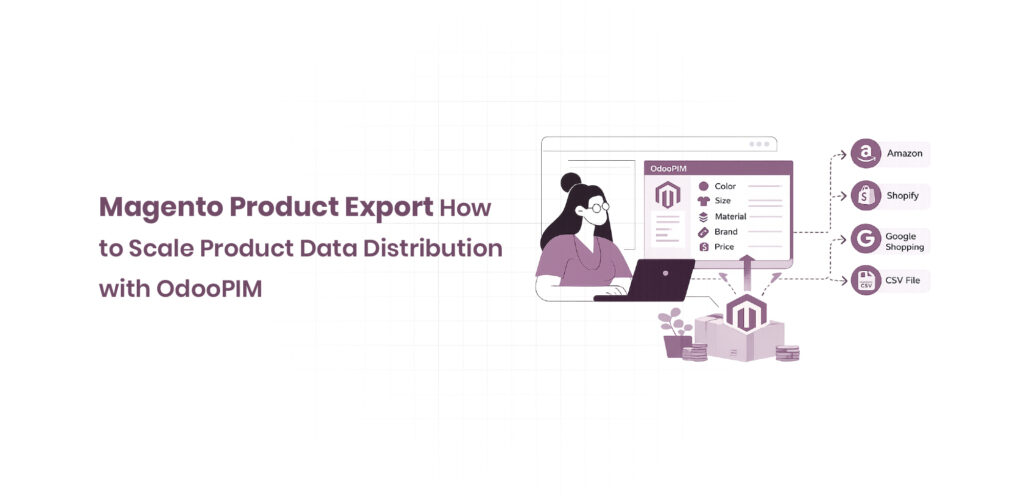
Magento product export is the process of extracting catalog data powered by magento product attributes, enabling structured movement of product information across systems. It forms the backbone of Magento data export, where teams handle Magento 2 export products, Magento export products in CSV, and even Magento export products with images for multi-channel use. In real implementations, magento product attributes ensure consistency in SKU, pricing, and inventory fields during transfer. Businesses also extend capability using Magento 2 product export extension and Magento product import export workflows. Advanced setups integrate OdooPIM-Magento product export to centralize data before pushing clean, enriched product feeds into Magento ecosystems.
What You Can Export From Magento
Magento allows export of nearly all catalog entities structured through magento product attributes, including product names, SKUs, descriptions, pricing, categories, stock status, and media. With Magento 2 export products, businesses can generate Magento export products in CSV files for bulk handling and reporting. You can also extract Magento export products with images, ensuring visual assets remain tied to product records. The system supports Magento 2 export product attributes, giving control over attribute-level customization. Many teams rely on Magento product import export processes for synchronization, while Magento 2 import products in CSV supports reverse workflows. For enterprise catalogs, Magento data export combined with OdooPIM-Magento product export improves structured data distribution.
Learn about Magento Integration Software.

How Magento’s Native Export Works
Magento’s native export works by mapping catalog data through magento product attributes, then generating structured output files, typically in CSV format. The default Magento 2 export products tool lets users filter products and export selected datasets as Magento export products in CSV, including basic or extended attribute sets. However, deeper control over Magento 2 export product attributes is limited without customization. The system also supports Magento export products with images, but performance depends on catalog size. For complex workflows, teams use Magento 2 product export extension or Magento product import export modules to enhance flexibility. In enterprise environments, Magento data export is often paired with OdooPIM-Magento product export for cleaner processing.
Common Use Cases for Exporting Product Data
Businesses use Magento export workflows driven by magento product attributes to power migrations, reporting, and multi-channel listings. A common use case is Magento 2 export products for marketplace onboarding using Magento export products in CSV formats. Retailers also rely on Magento export products with images for Google Shopping and Amazon feeds. Data teams frequently extract Magento 2 export product attributes for audits and catalog optimization. Migration projects depend heavily on Magento product import export and Magento 2 import products in CSV to move large datasets safely. Advanced enterprises combine Magento data export with Magento 2 product export extension and OdooPIM-Magento product export to maintain accuracy across systems and reduce manual errors.
Learn about Product lifecycle management.

How to Export Products in Magento 2
Exporting products in Magento 2 revolves around magento product attributes, which define how catalog data is structured and extracted through Magento 2 export products workflows. The system uses Magento data export tools to generate structured outputs like Magento export products in CSV, making large catalog handling efficient. Businesses rely on Magento product import export processes for syncing data across platforms, while Magento export products with images ensures complete product records. Advanced users often extend functionality using Magento 2 product export extension or OdooPIM-Magento product export to improve accuracy, especially when managing complex attribute sets and multi-channel distribution requirements.
Exporting Products via the Admin Panel
Magento 2 allows product export directly through the admin panel using built-in magento product attributes mapping. Users navigate to the export section under Magento 2 export products, select entity type as products, and apply filters before generating a dataset. This Magento data export process is widely used for quick extraction of Magento export products in CSV files without coding. It supports basic Magento 2 export product attributes, ensuring essential fields like SKU, price, and stock are included. Many businesses rely on this native Magento product import export flow for routine catalog backups, while Magento export products with images may require additional configuration or extensions for full media handling.
Exporting Products to CSV in Magento 2
Exporting to CSV in Magento 2 is the most common form of Magento 2 export products, where magento product attributes are mapped into structured columns for external use. The system generates Magento export products in CSV files that can be opened in Excel or imported into ERP tools. This Magento data export method ensures compatibility across platforms and supports bulk updates. It also includes selected Magento 2 export product attributes, depending on configuration. Teams frequently combine this with Magento product import export workflows for round-trip data handling. In advanced setups, Magento 2 product export extension and OdooPIM-Magento product export improve CSV accuracy and reduce manual formatting errors.
Learn about PIM Software comparision.
Exporting Product Attributes From Magento 2
Magento 2 enables export of specific magento product attributes, allowing teams to control exactly what data leaves the system. Through Magento 2 export product attributes, users can select attribute sets such as pricing, descriptions, or inventory fields during Magento data export. This flexibility supports targeted Magento export products in CSV files instead of full catalog dumps. Businesses often combine Magento product import export processes to maintain consistency across updates. While Magento export products with images handle media separately, attribute-level export ensures clean structured data. Advanced users rely on Magento 2 product export extension or OdooPIM-Magento product export for deeper attribute mapping and automation.
Exporting Products With Images
Exporting products with images in Magento 2 extends standard Magento product attributes by including media URLs or file references within Magento 2 export products workflows. This Magento data export process ensures that Magento export products with images retain visual consistency across marketplaces and storefronts. The resulting Magento export products in the CSV file includes image paths tied to SKU-based records. While basic Magento 2 export product attributes cover textual data, image handling often requires enhanced configuration. Many teams rely on Magento product import export workflows to sync images during re-import, and Magento 2 product export extension or OdooPIM-Magento product export to automate large-scale media management.
Learn about magento product attributes

Magento Product Import: The Other Side of the Workflow
Magento product import completes the cycle of magento product attributes by bringing structured data back into the system after Magento data export and Magento 2 export products workflows. It enables bulk creation and updates using Magento 2 import products in CSV, ensuring consistency across catalog operations. Businesses rely on Magento product import export processes to synchronize external systems, while Magento export products in CSV often serve as the source file. Import workflows also handle Magento export products with images, attribute mapping, and pricing updates. Advanced setups use Magento 2 product export extension and OdooPIM-Magento product export for cleaner, validated imports at scale.
How to Import Products Into Magento 2 via CSV
Importing products into Magento 2 via CSV relies on structured magento product attributes mapped into predefined columns within Magento 2 import products in CSV files. Users upload files through the admin panel under the import section and select entity type as products, aligning with Magento product import export workflows. The system validates Magento 2 export product attributes before processing to ensure accuracy in Magento data export-derived files. Many businesses reuse Magento export products in CSV as import templates. While Magento export products with images require correct URL mapping, Magento 2 product export extension and OdooPIM-Magento product export improve validation, reducing errors during large-scale catalog updates.
Importing Products With Images and Attributes
Importing products with images and attributes in Magento 2 depends heavily on correctly structured magento product attributes and accurate mapping in Magento 2 import products in CSV files. Each image URL must align with SKU records, ensuring smooth handling of Magento export products with images during Magento product import export workflows. Attribute sets such as price, description, and inventory are validated through Magento 2 export product attributes rules before execution. Businesses often use Magento data export files as import templates to maintain consistency. For complex catalogs, Magento 2 product export extension and OdooPIM-Magento product export help centralize attribute and media control, reducing mismatches and broken image links.
Through 2026, 75% of enterprises integrating automation into their data management workflows will reduce manual data handling costs by 30% or more.
– Gartner
Common Magento Import Errors and How to Fix Them
Common Magento import errors often arise from incorrect magento product attributes, mismatched Magento 2 import products in CSV formatting, or missing required fields during Magento product import export workflows. Typical issues include SKU conflicts, invalid attribute values, and broken image URLs from Magento export products with images. Errors in Magento 2 export product attributes mapping can also cause failed imports. These problems are usually resolved by validating Magento data export files before upload and correcting column structures. Many teams rely on Magento 2 product export extension or OdooPIM-Magento product export to automate validation, ensuring cleaner imports and reducing manual correction cycles in large catalogs.
Limitations of Magento’s Native Import and Export
While Magento provides built-in tools for Magento 2 export products and Magento 2 import products in CSV, its native capabilities become restrictive as catalogs grow. Managing thousands of magento product attributes across multiple channels creates complexity that basic Magento data export workflows cannot fully address. Businesses often encounter challenges with validation, automation, and performance when handling large product volumes. Although Magento product import export functionality supports standard operations, maintaining consistency across catalogs remains difficult. Many organizations adopt Magento 2 product export extension solutions or OdooPIM-Magento product export integrations to overcome these operational gaps and establish more scalable product data management processes.
No Automated or Scheduled Export Workflows
Native Magento tools support Magento 2 export products, but they do not provide built-in automation for recurring Magento data export tasks. Teams must manually generate Magento export products in CSV files whenever updates are required, increasing administrative effort and the risk of outdated information. As the number of magento product attributes grows, manual exports become increasingly inefficient. Businesses managing multiple marketplaces often need continuous synchronization, which native Magento product import export workflows cannot deliver. Although a Magento 2 product export extension may add scheduling features, many companies choose OdooPIM-Magento product export solutions to automate data distribution and maintain accurate product information across channels.
Data Quality Issues During Bulk Import
Bulk imports frequently expose weaknesses in how magento product attributes are managed during Magento 2 import products in CSV operations. Missing values, inconsistent formatting, duplicate records, and incorrect attribute mappings can disrupt Magento product import export workflows and create catalog inaccuracies. Since native validation is limited, errors may only become visible after products are imported. Issues involving Magento 2 export product attributes often lead to incomplete product records, affecting customer experience and operational efficiency. Companies handling large product catalogs typically introduce centralized data governance through OdooPIM-Magento product export systems to improve accuracy and strengthen Magento data export and import reliability.
Scaling Problems With Large Catalogs
As product volumes increase, native Magento tools struggle to efficiently process Magento 2 export products, Magento export products in CSV, and large-scale Magento 2 import products in CSV operations. Extensive magento product attributes, image references, and category relationships increase processing time and system load. Organizations with tens of thousands of SKUs often experience slower exports, failed jobs, or performance bottlenecks during Magento data export activities. Managing Magento export products with images becomes even more demanding because of additional media dependencies. To support growth, businesses commonly implement Magento 2 product export extension solutions or integrate OdooPIM-Magento product export platforms that are designed for high-volume catalog management.
Why Extensions Only Partially Solve the Problem
A Magento 2 product export extension can improve specific areas of Magento 2 export products and Magento product import export workflows, but extensions rarely address the root cause of product data complexity. They typically focus on individual functions such as scheduling, attribute mapping, or Magento export products in CSV generation while leaving data governance challenges unresolved. Poorly managed magento product attributes, inconsistent enrichment processes, and fragmented data sources continue to create quality issues. Even when extensions support Magento export products with images and advanced Magento 2 export product attributes, businesses still require centralized control. This is why many enterprises adopt OdooPIM-Magento product export solutions to manage product data at scale rather than relying solely on extensions.

How a PIM Replaces Manual Magento Import and Export
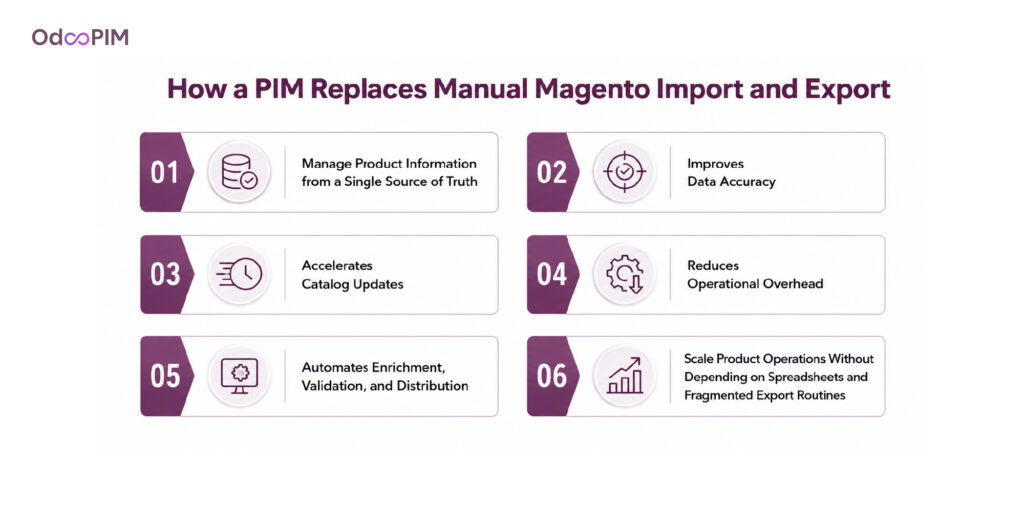
A Product Information Management (PIM) system transforms how businesses handle magento product attributes, eliminating the inefficiencies of repetitive Magento 2 export products and Magento 2 import products in CSV processes. Instead of relying on manual Magento data export activities, teams manage product information from a single source of truth before publishing it to Magento and other channels. This approach improves data accuracy, accelerates catalog updates, and reduces operational overhead. While traditional Magento product import export workflows require continuous intervention, a PIM automates enrichment, validation, and distribution. Solutions such as OdooPIM-Magento product export help businesses scale product operations without depending on spreadsheets and fragmented export routines.
1. Centralizing Product Data Outside of Magento
Managing product information directly inside Magento becomes increasingly difficult as the number of magento product attributes grows. A PIM centralizes all product content, technical specifications, media assets, and attribute data outside Magento, creating a single repository for product management. Instead of maintaining multiple Magento export products in CSV files, teams update information once and distribute it everywhere. This eliminates duplicate records and inconsistencies often found in manual Magento product import export processes. By centralizing data before Magento 2 export products occur, businesses gain greater visibility, governance, and control. OdooPIM-Magento product export workflows further streamline catalog management across multiple sales channels.
2. Structured Enrichment Before Data Reaches Magento
A major advantage of a PIM is its ability to enrich magento product attributes before information enters Magento. Product descriptions, specifications, categories, keywords, and media assets are validated and standardized in one place, reducing errors commonly seen during Magento 2 import products in CSV operations. Instead of correcting issues after Magento data export, teams ensure completeness before publication. This structured enrichment process improves product quality, search visibility, and customer experience. Businesses handling extensive Magento 2 export product attributes benefit from stronger data governance and consistency. Through OdooPIM-Magento product export, enriched product information reaches Magento already optimized and ready for distribution.
3. Automating Product Data Sync Instead of Manual Exports
Traditional Magento 2 export products workflows require users to manually generate files, process updates, and manage recurring Magento export products in CSV operations. A PIM replaces this approach with automated synchronization between systems. Changes made to magento product attributes are instantly prepared for distribution, eliminating repetitive Magento product import export tasks. This automation ensures accurate updates for pricing, inventory, descriptions, and Magento export products with images without manual intervention. Businesses reduce delays, improve operational efficiency, and maintain consistent product information across channels. With OdooPIM-Magento product export, product data moves seamlessly between systems, making Magento data export processes faster, more reliable, and easier to scale.
Learn about Magento SEO.
How OdooPIM Streamlines Magento Product Data Movement
OdooPIM simplifies product information management by creating a centralized workflow for magento product attributes before data reaches Magento. Instead of relying on repetitive Magento 2 export products, Magento export products in CSV, and Magento 2 import products in CSV processes, businesses manage, enrich, and validate product data in one platform. This approach improves consistency, reduces manual effort, and strengthens overall Magento data export operations. Teams no longer need to depend on fragmented spreadsheets or complex Magento product import export workflows. Through OdooPIM-Magento product export, product information moves seamlessly from source systems to Magento, ensuring accurate, scalable, and channel-ready catalog management.
1. Importing Supplier Data Into OdooPIM
Supplier product information often arrives in different formats, making magento product attributes difficult to manage directly in Magento. OdooPIM consolidates supplier spreadsheets, CSV files, ERP feeds, and external catalogs into a single environment before any Magento 2 export products activity occurs. This removes the complexity of handling multiple Magento 2 import products in CSV files and reduces manual formatting work. Businesses can standardize incoming data, align attribute structures, and prepare information for future Magento data export workflows. By centralizing supplier content early, OdooPIM-Magento product export creates a cleaner foundation for catalog growth and multi-channel product distribution.
2. Enriching and Validating Products in OdooPIM
OdooPIM allows businesses to enrich and validate magento product attributes before products are published. Teams can improve descriptions, specifications, categories, keywords, and media assets while applying quality checks across the catalog. This prevents errors commonly found during Magento product import export operations and reduces issues with Magento 2 export product attributes later in the workflow. Instead of correcting incomplete records after Magento data export, organizations ensure product data is complete and accurate from the start. This structured enrichment process supports better customer experiences, stronger search performance, and more reliable Magento export products with images across every sales channel.
3. Syncing Clean Product Data Directly to Magento
Once product information is validated, OdooPIM automates OdooPIM-Magento product export to Magento without requiring constant manual intervention. Updated magento product attributes are synchronized directly, eliminating repeated Magento export products in CSV generation and reducing dependence on manual Magento 2 import products in CSV processes. Product descriptions, pricing, inventory details, categories, and media assets remain aligned across systems. This automated approach strengthens Magento data export accuracy and minimizes synchronization errors. Businesses benefit from faster catalog updates, improved operational efficiency, and a more scalable alternative to traditional Magento product import export workflows.
Getting Started With OdooPIM and Magento
Getting started with OdooPIM and Magento begins by connecting product sources and defining the structure for magento product attributes. Businesses import supplier data, establish attribute standards, and configure workflows that support efficient Magento 2 export products and Magento product import export processes. OdooPIM then becomes the central hub for enrichment, validation, and governance before any Magento data export occurs. As product catalogs expand, automation replaces manual Magento export products in CSV handling and repetitive Magento 2 import products in CSV tasks. With OdooPIM-Magento product export, organizations gain a scalable framework for maintaining accurate product information and supporting long-term ecommerce growth.
Frequently Asked Questions
1. How Do I Export All Products From Magento 2?
To export all products from Magento 2, navigate to the export section in the admin panel and select products as the entity type. The system generates a Magento export product in a CSV file containing data defined by your Magento product attributes. This Magento 2 export products process supports catalog migration, reporting, and marketplace integrations. Businesses often use these files as templates for Magento 2 import products in CSV workflows or broader Magento product import export operations. For larger catalogs, Magento 2 product export extension tools and OdooPIM-Magento product export provide greater automation, flexibility, and control over Magento data export processes.
2. Why Is My Magento 2 Product Export Not Working?
A failed Magento 2 export products process is often caused by issues with magento product attributes, server limitations, invalid attribute values, or corrupted catalog records. Large Magento export products in CSV jobs may also exceed system resources, leading to incomplete exports. Problems with media references can affect Magento export products with images, while incorrect attribute configurations may disrupt Magento 2 export product attributes output. Reviewing export logs, validating product data, and checking system performance usually resolves the issue. Many businesses implement Magento 2 product export extension solutions or OdooPIM-Magento product export workflows to improve reliability and reduce export failures.
3. Can I Export Product Images From Magento?
Yes, Magento supports Magento export products with images by including image paths or media references within export files. During Magento 2 export products, image-related magento product attributes are exported alongside product information, making it easier to migrate catalogs or distribute content to external platforms. The exported Magento export products in CSV file typically contain image locations rather than the actual media files themselves. Businesses handling extensive media catalogs often use Magento 2 product export extension tools to improve image management. Integrating OdooPIM-Magento product export also helps maintain consistent image and attribute synchronization across channels.
4. How Is a PIM Different From Magento’s Import/Export Tool?
Magento’s native Magento product import export functionality focuses on moving product data in and out of the platform, while a PIM manages the entire lifecycle of magento product attributes before distribution. A PIM centralizes data, supports enrichment, validates content quality, and automates workflows that would otherwise rely on Magento export products in CSV and Magento 2 import products in CSV files. Instead of functioning as a simple Magento data export utility, a PIM acts as the master source of product information. Solutions such as OdooPIM-Magento product export provide stronger governance, consistency, and scalability than standard import/export tools.
5. Can OdooPIM Automate Magento Product Exports?
Yes, OdooPIM-Magento product export is designed to automate product data synchronization and reduce reliance on manual Magento 2 export products workflows. Product information and Magento product attributes are managed, enriched, and validated in OdooPIM before being automatically synchronized with Magento. This removes the need for repeated Magento export products in CSV generation and minimizes manual Magento 2 import products in CSV tasks. Businesses benefit from more accurate Magento data export, faster updates, and fewer data inconsistencies. As catalogs grow, automated Magento product import export workflows through OdooPIM provide a scalable and efficient alternative to traditional export methods.