Why Shopify’s Native Product Management Has Limits
Shopify is a world-class commerce platform built for storefront and checkout performance. It excels at selling products once data is ready. But it was never designed to govern product data upstream. As catalogs grow, these limitations become costly bottlenecks.
No data validation or mandatory field rules. Shopify accepts whatever you enter, no enforcement of required attributes, no validation against your standards. A product missing dimensions or materials goes live anyway. No product completeness scoring. You cannot measure catalog quality or prioritize fixes. No supplier data onboarding workflow. Supplier spreadsheets require manual mapping and cleaning before import.
Metafields management does not scale without specialist apps. Adding custom attributes means installing third-party tools, each adding complexity. No cross-channel enrichment or publishing logic. Shopify manages your store, not Amazon or eBay. Keeping listings consistent across channels requires manual exports. No audit trail for who changed what and when. Team members edit products, but you never know who made which change or why.
Shopify PIM integration adds the upstream governance that Shopify lacks. Shopify product information management fills the gap between raw supplier data and store-ready listings. The best PIM for Shopify works alongside your store, not instead of it. Shopify PIM software handles enrichment, validation, and syndication. A shopify catalog management tool built for scale prevents manual errors and version conflicts. Shopify does what it does best, selling. PIM does what Shopify cannot, governing product data.
Common Product Data Challenges for Shopify Stores
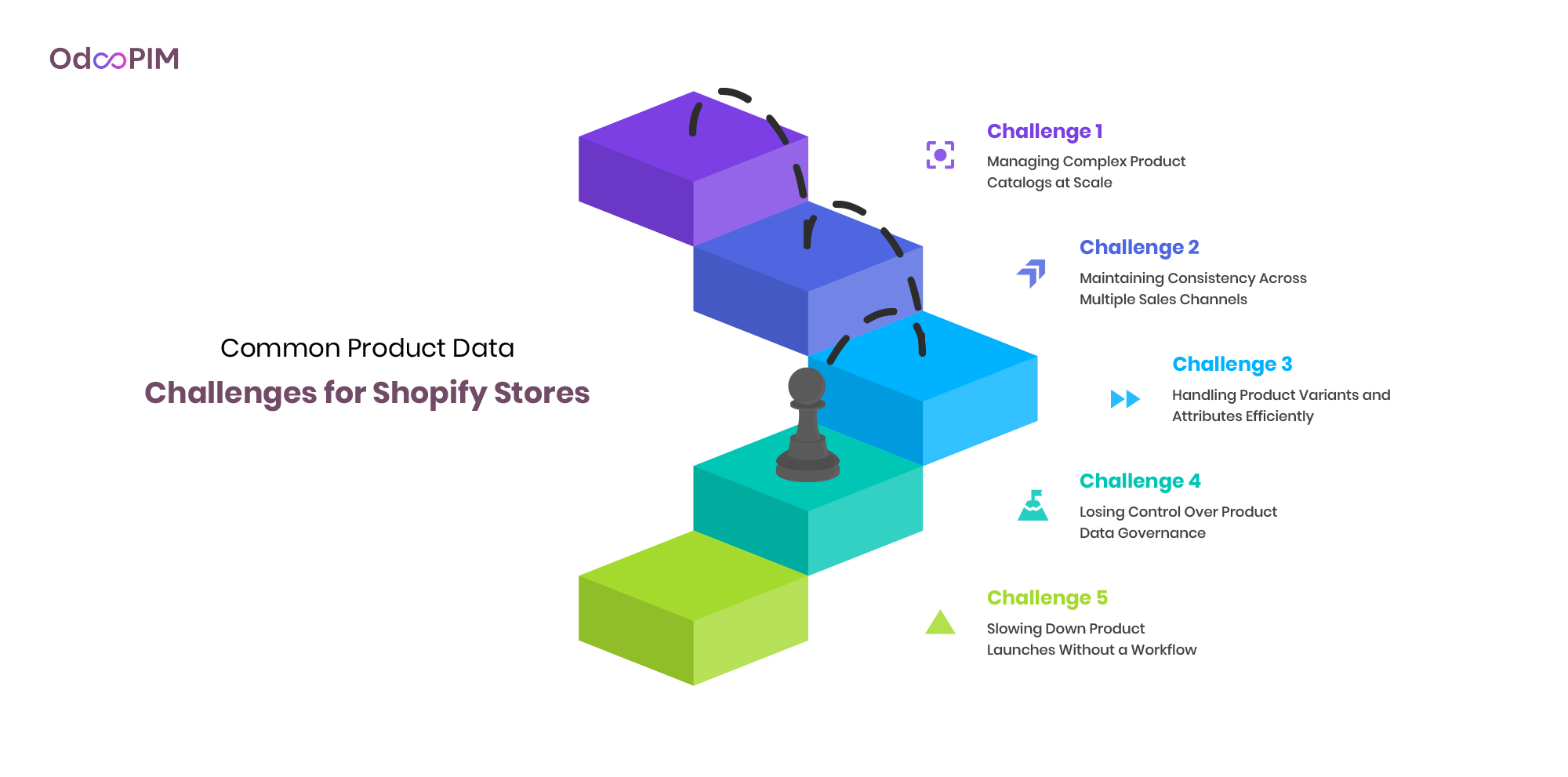
Challenge 1: Managing Complex Product Catalogs at Scale
As your catalog grows past 200 SKUs, spreadsheets break. Different team members maintain different versions. Manual updates consume hours. PIM for Shopify automates what manual processes cannot scale. Without shopify catalog management tool, errors multiply, missing attributes, inconsistent formatting, duplicate entries. Your team spends more time fixing mistakes than improving content.
Shopify product information management at scale requires structured data governance that native tools lack. Best PIM for Shopify automates enrichment and validation, turning catalog maintenance from bottleneck to background process.
Challenge 2: Maintaining Consistency Across Multiple Sales Channels
Selling on Shopify plus Amazon, eBay, or social channels creates consistent nightmares. Product descriptions drift. Images mismatch. Pricing falls out of sync. Shopify PIM integration ensures one product entry feeds every channel with channel-specific formatting automatically.
Shopify PIM software eliminates manual exports and reformatting. Update once, publish everywhere. Your customers see consistent information whether they shop on your store, Amazon, or Instagram. Shopify catalog management tool prevents the “why does this product look different here?” confusion that erodes trust.
Challenge 3: Handling Product Variants and Attributes Efficiently
Shopify’s variant limit (100 per product) and manual attribute management create bottlenecks. Adding a new color or size requires editing each variant individually. PIM for Shopify automates variation management, defines themes once, and applies across products.
Shopify product information management with bulk editing handles thousands of variants without manual repetition. Best PIM for Shopify propagates attribute updates across all variations automatically.

Challenge 4: Losing Control Over Product Data Governance
Shopify lacks audit trails, approval workflows, and role-based access. Anyone with admin access can edit anything, no visibility into who changed what or why. Shopify PIM software adds governance layers, approval workflows, version history, and permission controls.
Shopify PIM integration ensures products go live after required approvals. Compliance documentation is attached before publication. Shopify catalog management tool prevents unauthorized changes from reaching your storefront. Governance becomes systematic, not optional.
Challenge 5: Slowing Down Product Launches Without a Workflow
Without structured workflows, new products stall in email chains and spreadsheet attachments. Marketing waits for operations. Operations waits for suppliers. PIM for Shopify automates the launch process, supplier data enters, workflows route for approval, products publish automatically.
Shopify product information management with workflow automation compresses launch cycles from weeks to days. Best PIM for Shopify tracks progress, assigns tasks, and notifies team members. Your catalog grows faster because processes move work forward, not sideways.
How a PIM Solves Each Challenge
| Shopify Challenge | How OdooPIM Solves It |
| Complex catalogs at scale | PIM for Shopify like OdooPIM handles unlimited attributes and variant hierarchies with structured onboarding. No metafield workarounds needed. Your catalog grows without platform limitations. Shopify product information management at scale means no breaking point. |
| Multi-channel consistency | One governed product data record pushes to Shopify, Amazon, marketplaces, and B2B portals simultaneously. Shopify PIM integration ensures consistent titles, descriptions, and images everywhere. Update once. Publish everywhere. No manual exports. |
| Variant and attribute complexity | Governed variant models with validated pricing, images, and specifications for every configuration. Best PIM for Shopify automates variation management, defines themes once, and applies across products. No more editing each size or color individually. |
| Product data governance | Field-level permissions, mandatory field rules, approval workflows, and full change log, all before data ever reaches Shopify. Shopify PIM software ensures only approved, complete products go live. Audit trails track every edit. |
| Slow product launches | Enrichment workflows, completeness scoring, and automated Shopify publishing cut launch time significantly. Shopify catalog management tool compresses weeks of manual coordination into automated processes. New products reach customers faster. |
Why This Matters
The best PIM for Shopify doesn’t just store product data, it transforms how you manage it. Shopify product information management with workflow automation eliminates the bottlenecks that slow growing merchants. Shopify PIM integration adds upstream governance that Shopify’s native tools lack. Shopify PIM software turns catalog maintenance from a daily firefight into background automation. For merchants past 200 SKUs or selling across multiple channels, a shopify catalog management tool isn’t optional, it’s essential infrastructure for scaling without breaking.
Learn about catalog management software.

Key PIM Capabilities for Shopify Success
1. Centralised Product Data
PIM for Shopify starts with a single source of truth. Every SKU, attribute, image, and specification lives in one place, no spreadsheets, no version conflicts. Shopify product information management without centralization guarantees inconsistency. Your team stops asking “which file is current?” and starts improving content. Best PIM for Shopify ensures every channel pulls from the same governed data.
Shopify catalog management tool with centralized data eliminates duplicate work. Marketing updates once. Operations approved once. Every channel receives the same accurate information. Shopify PIM integration turns fragmented spreadsheets into structured assets. Your catalog becomes reliable, not reactive.
2. Shopify-Ready Publishing
Shopify PIM software must publish to your store, not through manual exports. PIM for Shopify with native connectors pushes product data, images, and variants to Shopify’s API. No CSV uploads. Shopify product information management automates what manual processes cannot scale.
Best PIM for Shopify handles Shopify’s specific requirements, metafields, variant limits, SEO fields, automatically. Shopify PIM integration ensures every product meets platform requirements before publication. Your store stays updated without manual intervention. Shopify catalog management tool makes publishing part of your workflow, not a separate task.
3. Multichannel Distribution
Shopify isn’t your only channel. PIM for Shopify must syndicate to Amazon, eBay, marketplaces, and social commerce simultaneously. Shopify product information management without multichannel distribution forces manual exports to every destination. Best PIM for Shopify handles channel-specific formatting automatically, Amazon gets flat descriptions, your store gets rich content.
Shopify PIM software with multichannel syndication ensures consistent product experiences everywhere customers shop. Update once, publish everywhere. Shopify PIM integration eliminates the “did we update Amazon?” uncertainty. Shopify catalog management tool turns multichannel complexity into background automation.
4. Operational Efficiency — Faster Enrichment, Fewer Manual Steps
PIM for Shopify includes AI-assisted attribute filling, completeness scoring, and bulk editing. Shopify product information management automates the 20–46 minutes per SKU that manual data entry consumes. Best PIM for Shopify turns catalog maintenance from bottleneck to background process.
Shopify PIM software with workflow automation routes products through approval steps automatically. No email chains, no spreadsheet attachments. Shopify PIM integration compresses launch cycles from weeks to days. Shopify catalog management tool measures what matters, completeness scores show where gaps exist. Your team focuses on strategy, not data entry.
5. Consistent Product Experiences Across Every Channel
Customers expect the same product information whether they shop on your Shopify store, Amazon, or Instagram. PIM for Shopify ensures consistency through governed data that feeds every channel. Shopify product information management prevents the “why does this product look different here?” confusion that erodes trust.
Best PIM for Shopify maintains title consistency, image standards, and attribute completeness across every destination. Shopify PIM software with channel-specific formatting adapts content without changing meaning. Shopify PIM integration means your brand voice remains consistent everywhere. Shopify catalog management tool protects your brand reputation through consistent product experiences.
6. OdooPIM’s Additional Advantage — ERP-Native Architecture
Unlike standalone PIM for Shopify tools requiring middleware, OdooPIM shares the same database as Odoo ERP. Shopify PIM integration becomes native, no sync delays, no API mapping costs. When inventory updates in your ERP, your Shopify catalog reflects it instantly. Shopify product information management with ERP-native architecture eliminates the integration tax.
Best PIM for Shopify for Odoo users means catalog, inventory, and operations unified. Shopify PIM software built on Odoo adds catalog management without introducing a new platform or integration to maintain. Shopify catalog management tool that grows with your business, from hundreds to thousands of SKUs without platform migration. This is OdooPIM’s advantage. No other PIM for Shopify offers native ERP integration at this depth.
Learn about Best Product Information Management (PIM) Software
How to Integrate a PIM with Shopify: Step by Step
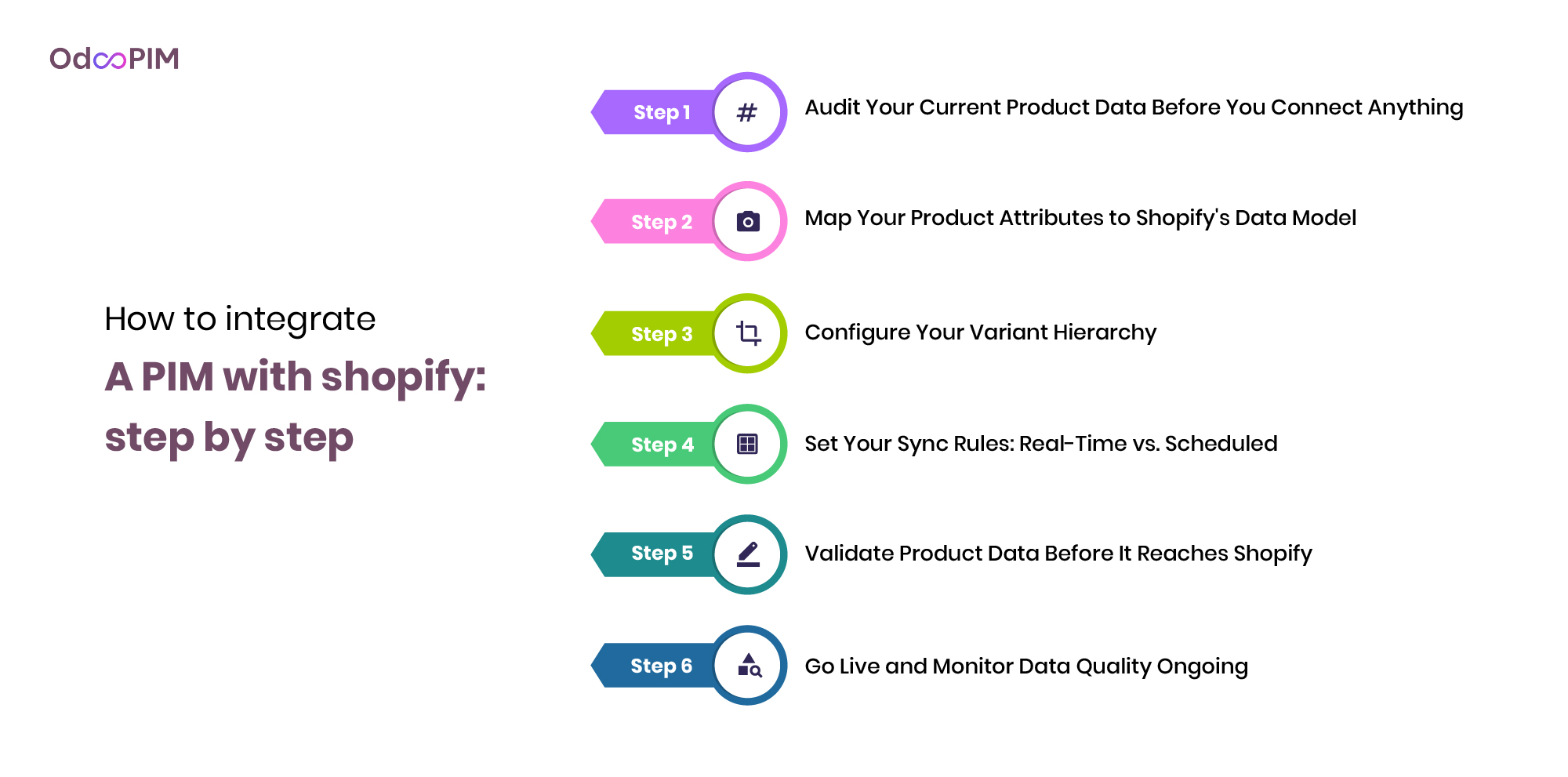
Step 1: Audit Your Current Product Data Before You Connect Anything
Before implementing PIM for Shopify, audit your existing product data. Identify missing attributes, inconsistent formatting, and duplicate entries. Shopify product information management succeeds when you start with honest assessment. The best PIM for Shopify cannot fix what you don’t measure. Document your catalog’s current state, completeness scores, variation structures, image compliance.
Shopify PIM integration requires clean data foundations. Spreadsheet chaos won’t resolve when connected to a PIM. Shopify catalog management tool audits reveal where gaps exist. Fix what you can before migration. Your PIM implementation will be faster and more effective with a clean starting point.
Step 2: Map Your Product Attributes to Shopify’s Data Model
Shopify PIM software must map your product attributes to Shopify’s data model. Titles map to titles. Descriptions map to descriptions. Custom attributes map to metafields. PIM for Shopify with flexible attribute mapping handles one-to-one and one-to-many relationships. Shopify product information management requires clear mapping rules before syncing.
Best PIM for Shopify automates attribute mapping through templates and rules. Define mappings once, apply across catalog. Shopify PIM integration without proper mapping creates data chaos. Test mappings with sample products before full sync. Validate that titles, images, and variants appear correctly in your Shopify store before going live.
Step 3: Configure Your Variant Hierarchy
Shopify catalog management tools must handle variant hierarchies correctly. Define your variation themes, size, color, style, at the PIM level. PIM for Shopify with governed variant models ensures parent-child relationships sync to Shopify. Shopify PIM software propagates attribute updates across all variants automatically.
Shopify product information management requires testing variant sync before full deployment. Check that size options appear correctly, images map to variants, and pricing rules apply accurately. Best PIM for Shopify prevents the broken variation structures that plague manual management. Configure once. Validate. Then scale across your catalog.
Step 4: Set Your Sync Rules: Real-Time vs. Scheduled
Shopify PIM integration requires clear sync rules. Real-time sync updates Shopify when you change data in PIM, ideal for pricing and inventory. Scheduled sync batches updates at defined intervals, suitable for description improvements and image updates. PIM for Shopify should support both modes, letting you choose per data type.
Shopify product information management with flexible sync rules balances immediacy with system load. Shopify PIM software real-time sync for critical data like stock levels. Scheduled sync for enrichment updates that don’t require publication. Best PIM for Shopify lets you configure sync rules per attribute family.
Step 5: Validate Product Data Before It Reaches Shopify
Shopify catalog management tool must validate before publishing. PIM for Shopify with completeness scoring ensures products meet your quality standards before syncing to your store. Shopify product information management should block incomplete products from reaching customers. Set mandatory field rules, image requirements, and attribute validation.
Best PIM for Shopify with approval workflows routes products through review before publication. Shopify PIM software validates against Shopify’s requirement, title length, image specifications, variant limits. Shopify PIM integration catches errors before they appear on your storefront. Validate in PIM, approve workflow then sync to Shopify.
Step 6: Go Live and Monitor Data Quality Ongoing
PIM for Shopify go-live starts with a pilot catalog subset, not your inventory. Test sync with 50–100 products first. Shopify product information management monitors data quality continuously after launch. Shopify PIM software with completeness dashboards shows catalog health metrics, missing attributes, suppressed listings, pending approvals.
Best PIM for Shopify establishes ongoing monitoring routines. Weekly audits catch issues before they impact sales. Shopify catalog management tool with alerting notifies you when data quality drops below thresholds. Shopify PIM integration success depends on continuous attention, not just initial setup. Monitor, measure, improve your catalog quality compounds over time with proper governance.
Learn about Best PIM software for small retail business

OdooPIM for Shopify: What Makes It Different
Most PIM technologies for Shopify tools are standalone systems that bolt onto your stack. They require separate subscriptions, separate integrations, and constant maintenance. OdooPIM takes a different approach, it’s built natively on Odoo, sharing the same database as your ERP, inventory, and operations. This architectural difference eliminates the integration tax that plagues other shopify PIM integration solutions.
| Feature | Standalone PIM + Shopify | OdooPIM (Odoo-Native) + Shopify |
| ERP connectivity | Third-party integration required | Native, same system |
| Integration maintenance | Ongoing license + development cost | Minimal |
| Product data and inventory sync | Multi-point, potential data drift | Single data model, no drift |
| Supplier data onboarding | Separate workflow | Built into Odoo purchasing |
| Total cost of ownership | Higher | Lower for Odoo users |
| Implementation complexity | High | Moderate |
| Best for | Businesses not on Odoo | Odoo users and Odoo evaluators |
Why This Difference Matters
Shopify product information management with standalone PIM tools means managing two systems, two subscriptions, and sync maintenance. The best PIM for Shopify for Odoo users is OdooPIM because it eliminates the integration layer. Shopify PIM software built on Odoo ensures product data, inventory, and orders never drift. Shopify catalog management tool with native ERP integration means no middleware, no sync delays, no reconciliation work. PIM for Shopify that shares your operational database is the only way to scale without fragmentation.
Case Study: How Paracord Manages 15,000+ SKUs from One Platform
Paracord’s catalog had outgrown its tooling. With over 15,000 SKUs and heavy variant complexity, product data lived in spreadsheets — and every marketplace listing was managed through individual connector platforms. When a product went out of stock, someone had to log into the connector, find the listing, and disable it by hand. Multiply that across thousands of products and multiple channels, and catalog maintenance had become a full-time bottleneck.
After moving to OdooPIM:
- One source of truth — all 15,000+ SKUs, variants, kits, and bundles managed in a single platform instead of scattered spreadsheets
- Channel sync, not channel logins — availability changes push to every connected sales channel automatically; no more manual disabling through connector dashboards
- Variant creation at scale — new variants built inside the PIM instead of duplicated row-by-row
- Centralized media assets — images and files attached once, published everywhere
The result: consistent product data across channels and a publishing process that no longer depends on someone remembering to update each marketplace by hand.
Learn about PIM for distributors
Best PIM for Shopify: Platforms to Evaluate
Not all PIM for Shopify tools are built the same. The table below compares leading shopify PIM integration options across core focus, ERP dependency, and Shopify fit. Evaluate based on your tech stack, catalog size, and operational needs.
| Vendor | Core Focus | ERP Dependency | Best For | Shopify Fit |
| OdooPIM | Odoo-native PIM + ERP unified platform | None. ERP is the same system | Odoo users, mid-market to enterprise ecommerce | Native Odoo-Shopify sync, no middleware, lowest TCO for Odoo merchants |
| Inriver | Enterprise PIM, commerce-focused | Requires integration | Mid-market to enterprise brands | Certified Shopify connector, strong syndication |
| Akeneo | Product enrichment and catalog management | Requires integration | Brands needing enrichment workflows | API-ready, strong multi-language support |
| Pimcore | Modular PIM + MDM + DAM | Requires integration | Teams needing PIM plus data management | Flexible data modeling, omnichannel publishing |
| Sales Layer | Centralised product catalog hub | Requires integration | SMB to mid-market Shopify merchants | Straightforward channel connectors, fast setup |
| Salsify | PXM combining PIM, DAM, syndication | Requires integration | Large brands with retailer networks | Strong content readiness and syndication tools |
How to Use This Table
Shopify product information management starts with understanding your operational context. The best PIM for Shopify for Odoo users is OdooPIM, because ERP and PIM share the same database, eliminating middleware costs and sync delays. Shopify PIM software like Inriver, Akeneo, or Sales Layer may fit better if you’re not on Odoo and don’t plan to be.
PIM for Shopify evaluation should include total cost of ownership, not just subscription fees. Standalone shopify catalog management tool requires integration maintenance, API mapping, and ongoing sync oversight. OdooPIM’s ERP-native architecture eliminates these hidden costs for Odoo merchants. For non-Odoo businesses, other shopify PIM integration options may be more appropriate. Choose based on your actual tech stack, not feature lists alone.

Frequently Asked Questions
1. Does Shopify have a built-in PIM?
Shopify does not have a built-in PIM. It offers native product management for storefront-ready data, but lacks upstream governance, no data validation, completeness scoring, supplier onboarding workflows, or audit trails. Shopify product information management requires external tools once catalogs grow past 200 SKUs or sell across multiple channels.
Best PIM for Shopify fills this gap by adding the enrichment, validation, and syndication capabilities that Shopify’s native tools lack. PIM for Shopify works alongside your store, not instead of it. Shopify handles checkout and storefront. PIM handles data governance upstream.
2. How do you integrate a PIM with Shopify?
Shopify PIM integration usually uses API-based connectors. Most Shopify PIM software offers pre-built connectors that sync product data, images, and variants to Shopify’s API. Setup involves authenticating your store, mapping attributes, and configuring sync rules, real-time for pricing, scheduled for enrichment updates.
Shopify catalog management tool integration requires testing before full deployment. Start with a pilot catalog subset. Validate that titles, variants, and metafields appear correctly. PIM for Shopify with native Odoo integration eliminates middleware, product data, inventory, and orders that share the same database. No API mapping, no sync delays.
3. What is the difference between OdooPIM and a standalone PIM for Shopify?
Standalone PIM for Shopify requires separate integration with your ERP, adding middleware costs, sync delays, and maintenance overhead. Shopify PIM integration with standalone tools means managing two systems, two subscriptions, and constant reconciliation between product data and inventory.
The best PIM for Shopify for Odoo users is OdooPIM because it shares the same database as your ERP. No middleware, no data drift. Shopify product information management with OdooPIM means catalog, inventory, and operations unified. Standalone tools cannot match this integration depth for Odoo merchants.
4. Can a PIM manage Shopify metafields at scale?
PIM for Shopify should manage metafields at scale. Shopify product information management with metafield support lets you define custom attributes once in PIM and map them to Shopify’s metafield structure. Bulk editing across thousands of products eliminates manual metafield entry.
Shopify PIM software with flexible attribute modeling handles complex metafield requirements, size charts, technical specifications, warranty information. Shopify catalog management tool propagates metafield updates across all relevant products automatically. Without PIM, metafield management requires third-party apps and manual entry that doesn’t scale.
5. When does a Shopify store need a PIM?
A Shopify store needs PIM for Shopify when managing over 200 SKUs or selling across multiple channels beyond Shopify. Signs include, spreadsheets breaking down, inconsistent product data between store and Amazon, returns caused by missing specifications, and teams losing time to manual enrichment.
Best PIM for Shopify becomes essential when manual processes consume strategy time. Adding a single product manually takes 20–46 minutes. Shopify product information management with automation pays for itself in reclaimed hours. If your team spends more time on spreadsheets than growth, you need a shopify catalog management tool.
6. How much does a PIM for Shopify cost?
PIM for Shopify pricing varies by vendor and catalog size. Entry-level shopify PIM software like Plytix starts around $100–200 monthly for smaller catalogs. Mid-market solutions range $500–2,000 monthly. Enterprise options like Akeneo or Salsify mostly exceed $2,000–5,000 monthly plus implementation.
Best PIM for Shopify for Odoo users is OdooPIM with transparent tiered pricing within the Odoo ecosystem, no per-SKU fees. Evaluate total cost of ownership, standalone tools require middleware, API maintenance, and integration overhead. Shopify catalog management tool with native ERP integration may have higher subscription but lower TCO for Odoo merchants.