What Is a Product Information Management System?
A product information management system centralizes, enriches, and distributes all product data, descriptions, specifications, images, pricing, from one master source to sales channels. Unlike spreadsheets that create version chaos or ERPs that lack enrichment features, a PIM system provides data modeling, validation rules, approval workflows, and automated syndication to ecommerce platforms, marketplaces, and distributor portals. PIM software ensures your website, Amazon, Google Shopping, and retail partners all display consistent, accurate product information because every update flows from the same source. Whether you need PIM for ecommerce, PIM for distributors, or PIM software for small business, the core function remains the same: one system, infinite outputs, zero manual reformatting.
Why Businesses Need a PIM System in 2026
The Problem With Managing Product Data in Spreadsheets
Spreadsheets feel familiar, but they fail silently at scale. Two people editing the same file create version conflicts. A merged cell breaks formulas. No audit trail exists, so you never know who changed what or when. Product data management in spreadsheets means your team wastes hours hunting for the correct version instead of improving product content. Product catalog management without a PIM system guarantees errors. A wrong price reaches your website because someone edited the wrong column. A missing image goes live because no validation checked for it.
The real cost appears in errors and lost productivity. A team of three spending ten hours weekly on spreadsheet cleanup costs roughly $15,000 annually in labor. Product data quality suffers because spreadsheets have no concept of data types or required fields. PIM software automates validation, blocks incomplete products, and maintains version history. For any catalog above 500 products, spreadsheets become a liability. Product information management system adoption pays for itself through time saved and errors eliminated.

How Data Silos Kill Your Time-to-Market
Marketing maintains descriptions in spreadsheets. Operations keep specs in the ERP. Sales manages pricing in separate files. Centralized product data does not exist. A product launch requires touching three different systems, each with its own format and update schedule. Multichannel product data distribution becomes a manual nightmare. Your team exports from the ERP, emails spreadsheets to marketing, waits for files to return, manually merges changes, then uploads to each channel separately.
Silos also create duplicate work and inconsistent results. Marketing enriches a product. Operations enriches the same product independently. PIM integration with ERP eliminates this fragmentation. A PIM system pulls data from your ERP, enriches it, and pushes to the channels automatically. Product master data lives in one place. Launch timelines collapse from weeks to days. PIM for ecommerce with strong syndication turns channel distribution from a bottleneck into a competitive advantage.
Signs Your Business Is Ready for a PIM System
Your team spends more than ten hours weekly on product data entry or cleanup. Spreadsheet tabs multiply. No one knows which file is current. Product data governance is impossible because the tools do not support it. PIM software for small businesses would cut that time by 70%. You sell on multiple channels and maintain separate catalogs for each. A price change requires logging into three different systems. Cloud PIM software automates this. Update once in the PIM. All channels update automatically.
Customers complain about inconsistent information across channels. Your website shows one price; Amazon shows another. Product data quality issues trigger returns and erode trust. PIM tools comparison would show that a dedicated PIM prevents these discrepancies through validation and automated syndication. You have added new products, suppliers, or channels faster than your team can manage manually. PIM for distributors scales with your growth. If you recognize any of these signs, you are ready. Waiting longer only increases technical debt and customer frustration.

Key Features to Look for in a PIM System
1. Centralized Product Data Repository
A product information management system must store every product attribute, image, and specification in one database, replacing scattered spreadsheets and siloed files. Centralized product data eliminates version conflicts and the “which file is current?” debate that wastes hours weekly. Product master data lives in one place, so your team stops reconciling conflicts and starts improving product content. The repository must support nested attributes, variant relationships, and digital assets linked directly to products. Without centralization, product data management fails because every other feature depends on a single source of truth.
2. Multichannel Publishing and Data Syndication
Your PIM system must push product data to sales channels automatically, your website, Amazon, Google Shopping, distributor portals, and retail partners all receive correctly formatted feeds. Multichannel product data syndication requires channel-specific transformation rules where your master description becomes Amazon bullet points, website long-form copy, and distributor catalog snippets automatically. PIM for ecommerce includes pre-built connectors for major platforms like Shopify, Magento, and WooCommerce, plus validation checks before publishing to each destination. PIM for distributors handles role-based catalogs where each partner sees only their approved products with their pricing.
3. Workflow Automation and Role-Based Approvals
A product information management system without workflow automation is just a shared database. Product data governance requires assigning tasks, enforcing approval chains, and tracking completion. A junior editor enriches a product, and the system routes it to a senior reviewer for description approval, then to legal for compliance signoff, then to operations for spec verification. PIM software tracks who is waiting, who is overdue, and what is approved. Role-based permissions ensure marketing edits descriptions but not specifications, while operations edits specs but not SEO metadata. Only after all signoffs does data reach your channels.
4. ERP, CMS, and eCommerce Integration
PIM integration with ERP is non-negotiable for most businesses. Your ERP holds inventory, pricing, and basic identifiers while your PIM holds enriched content, and the two must sync automatically. When your ERP updates inventory, the PIM receives that change and syndicates it to all channels. PIM for ecommerce also needs native connectors to Shopify, Magento, and WooCommerce supporting real-time or scheduled sync. CMS integration ensures product data flows into landing pages, blog posts, and category pages automatically. PIM tools comparison should evaluate integration depth, testing two-way sync, failure handling, and retry logic with your systems.
5. AI-Powered Data Enrichment and Quality Checks
AI transforms the product data management process from manual drudgery to automated efficiency. Upload a spec sheet, and AI writes product descriptions, bullet points, and SEO meta tags in minutes, cutting manual writing time by 70%. The system also fills missing attributes, a product with color listed as “Dark Blue” gets AI-suggested standardization to “Navy” based on your attribute library. Product data quality improves because AI applies rules consistently across thousands of products while flagging outliers and inconsistencies that human reviewers miss. Cloud PIM software with AI capabilities scales enrichment without scaling headcount, turning a five-person job into a one-person review.

PIM System vs. Other Data Tools: What’s the Difference?
PIM vs. ERP: Why You Need Both
An ERP manages transactions: inventory levels, purchase orders, financials, and basic product identifiers like SKU and cost. A product information management system manages enrichment: descriptions, images, SEO metadata, and channel-specific content that ERPs cannot handle. The ERP answers “how many units do we have and what did we pay?” The PIM system answers “what are its specifications and why should someone buy it?” Neither replaces the other. PIM integration with ERP ensures data flows both ways so inventory updates in the ERP enrich product records in the PIM.
Without both systems, you face a trade-off. ERP alone gives you structured transactional data but no storytelling. Spreadsheets give you enrichment but no structure. Product data management requires both accuracy and storytelling. PIM for ecommerce alongside your ERP provides the complete picture. Your ERP handles the back end. Your PIM handles the front end. Together, they turn operational data into customer-facing content. Choose one without the other, and your product data remains incomplete.
PIM vs. MDM (Master Data Management)
MDM manages all critical business data across an organization: customers, suppliers, employees, locations, and products. Product information management system focuses exclusively on product information. MDM is broader but shallower for product use cases. Product master data within MDM typically includes basic attributes like SKU, name, and category. But MDM lacks enrichment features like SEO description writing, image management, and channel syndication. PIM software goes deeper into product-specific workflows.
Choose MDM when you need enterprise-wide data governance across multiple domains, customer, product, supplier, location. Choose a PIM system when you need product-specific enrichment, channel syndication, and digital shelf optimization. Many large enterprises use both. MDM governs the core product master data. PIM enriches and distributes it. PIM tools comparison should consider whether you need MDM integration. For most product-focused teams, a dedicated PIM provides more value than a general-purpose MDM.
PIM vs. DAM (Digital Asset Management)
A DAM stores raw media files: images, videos, PDFs, and 3D models. A product information management system stores product attributes and links to those media files. The PIM knows which image belongs to which product variant. The DAM stores the actual file. Centralized product data within a PIM includes references to DAM assets, but the PIM does not replace DAM functionality. For enterprises with massive media libraries, a dedicated DAM feeding into your PIM is the right architecture.
The two systems complement each other. Basic PIM software includes simple DAM features like image storage and basic organization. For teams under 5,000 images, that suffices. For larger libraries, integrate a dedicated DAM. Cloud PIM software with DAM integration lets you browse your DAM from within the PIM. Advanced integration syncs metadata both ways, image alt text from your PIM updates your DAM, and DAM usage analytics flow back to your PIM. Product catalog management improves when assets and attributes live in connected systems.
PIM vs. CMS: Not the Same Thing
A CMS (Content Management System) like WordPress or Shopify manages front-end presentation, web pages, blog posts, and site navigation. A product information management system manages back-end product data that feeds into those pages. The CMS displays what the PIM provides. PIM for ecommerce stores descriptions, images, and specifications. The CMS renders them on product pages. Think of CMS as your store window. Think of PIM as your warehouse. You need both, but they serve completely different jobs.
The confusion arises because some ecommerce platforms include basic PIM-like features. Shopify has product fields. WooCommerce has attributes. But these are not product data management systems. They lack bulk enrichment, channel syndication, approval workflows, and data governance. PIM software for small business complements your CMS rather than replacing it. Multichannel product data distribution requires a PIM because CMS platforms only push to your website. They cannot syndicate to Amazon, Google Shopping, and distributor portals. Use CMS for presentation. Use PIM for distribution.
Learn about PIM for shopify

Benefits of Implementing a Product Information Management System
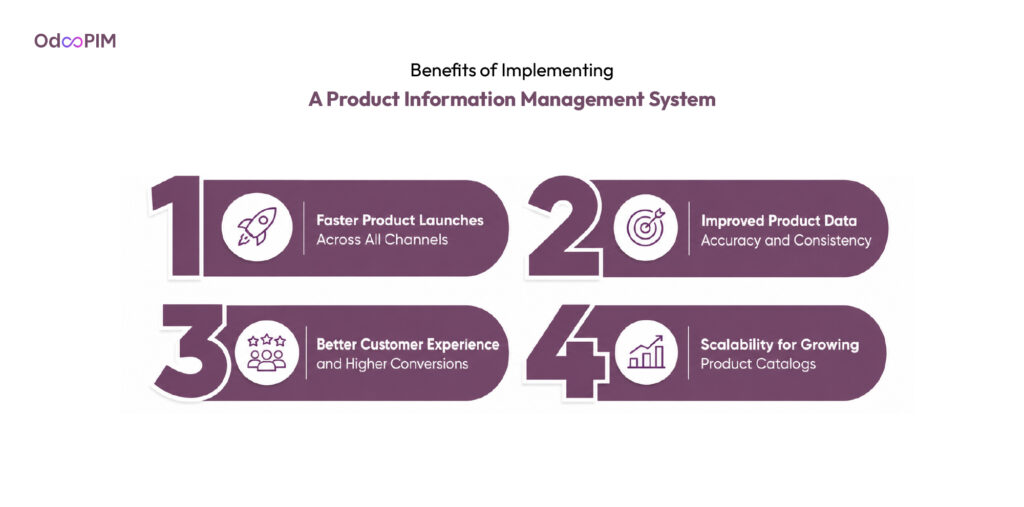
Faster Product Launches Across All Channels
A product information management system collapses launch timelines by eliminating manual data entry across multiple systems. Your team enriches product information once in the PIM system, then syndicates to channels simultaneously. What took two weeks of spreadsheet wrangling now takes two days. PIM for ecommerce users report cutting new product setup time by 70% because bulk editing, templates, and automated attribute assignment replace repetitive clicking.
The speed advantage grows with catalog size. A seasonal collection of fifty products that required two weeks of manual entry becomes a two-day job. Product catalog management with a PIM means your team stops chasing launch deadlines and starts launching ahead of competitors. Cloud PIM software enables remote teams to enrich and approve products from anywhere. Faster launches mean faster revenue.
Improved Product Data Accuracy and Consistency
Errors multiply with channels you add. A wrong dimension on your website goes unnoticed; that same error on Amazon triggers returns and chargebacks. Product data quality with a PIM system applies validation rules at entry, not after damage spreads. The system flags missing images, mismatched prices, and incomplete attributes before publishing. Centralized product data means one correction fixes every destination simultaneously.
Manual data entry creates two problems: it consumes hours, and it introduces errors. The product information management system eliminates both. Your team stops copying descriptions between spreadsheets and double-checking prices across systems. PIM integration with ERP pulls accurate inventory and pricing from your source systems. Accuracy becomes automatic, not aspirational. Your customers see consistent information whether they shop on your site, Amazon, or a distributor portal.
Better Customer Experience and Higher Conversions
Customers notice inconsistent product data. A size chart that differs between your website and Amazon confuses shoppers. Missing specifications make comparison shopping impossible. Multichannel product data managed through a PIM system ensures channels display complete, accurate information. Shoppers find what they need. Filters work. Product comparisons make sense. The result: higher conversion rates and lower bounce rates.
Rich product content also drives conversions. PIM software enables you to add SEO descriptions, lifestyle images, comparison charts, and video demonstrations that spreadsheets cannot manage. Product data management with a PIM means every product has a complete story. Customers buy with confidence because they have all the information they need. PIM for distributors ensures B2B buyers see technical specs alongside marketing copy. Better content means better conversions. Better conversions mean more revenue. A product information management system pays for itself through improved customer experience alone.
Scalability for Growing Product Catalogs
Spreadsheets work at 500 products. They crack at 5,000. Ecommerce platform backends handle entry but choke on complex attribute hierarchies. A PIM system scales linearly with your business. Add 10,000 products? The same workflows apply. Add five new sales channels? Configure mapping rules once, and syndication scales automatically. Cloud PIM software means no server upgrades or performance degradation as your catalog grows.
Product master data management at scale requires automation. A PIM handles variant generation automatically, adds a new color to a shirt style, and the system creates every size-color variant instantly. Product catalog management for large catalogs includes bulk editing, template-based enrichment, and automated validation that manual processes cannot match. PIM software for small businesses grows with you. Start with 500 products. Scale to 50,000. The same workflows apply. Your team does not need to double. The PIM scales instead. That is the scalability promise only a dedicated product information management system delivers.
Who Uses PIM Systems? Industries and Use Cases
PIM for eCommerce Retailers
Retailers selling on multiple channels need PIM for ecommerce to maintain consistent product data across their website, marketplaces, and social commerce. A fashion brand selling on Shopify, Amazon, and Instagram uses a product information management system to store one master record that transforms into channel-specific formats automatically. Multichannel product data syndication eliminates the manual copy-paste work that creates discrepancies between channels. Retailers also benefit from bulk editing and template-based enrichment for seasonal collections.
PIM software for retailers prioritizes speed and visual workflows. Merchandisers need drag-and-drop image assignment, inline editing, and channel previews that show how a listing will appear on Amazon versus their own store. Product catalog management for retail includes automated SEO field generation and integration with marketplaces like eBay and Walmart. Cloud PIM software suits retailers with distributed teams. The result: faster product launches, consistent customer experience, and fewer channel-specific errors.
Learn about PIM software in India.
By 2027, 70% of organizations will adopt modern data quality solutions to better support their AI adoption and digital business initiatives
– Gartner, Magic Quadrant for Augmented Data Quality Solutions
PIM for Manufacturers and Distributors
Manufacturers face technical complexity that retail-focused PIMs cannot handle. A motor manufacturer needs nested attribute hierarchies, CAD file management, compliance certificates, and compatibility matrices. PIM for distributors must support role-based catalogs where different partners see different pricing and product assortments. PIM integration with ERP is non-negotiable because manufacturers manage inventory and pricing in SAP, Microsoft Dynamics, or Odoo. Centralized product data pulls from ERP and enriches technical specs before syndicating to B2B portals.
Distributors need product master data that works for both internal sales teams and external customers. A distributor selling to repair shops and consumers requires different views of the same product. Product data management for distributors includes automated syndication to reseller networks and print catalog generation. PIM tools comparison for manufacturing should prioritize ERP integration, attribute hierarchy depth, and B2B workflow automation over retail-centric features like lifestyle imagery and SEO descriptions.
PIM for B2B Companies With Complex Catalogs
B2B companies selling industrial supplies, medical equipment, or electronic components face massive SKU counts with subtle variations. A bearing supplier might have 10,000 SKUs differing only by inner diameter, outer diameter, and material. The PIM system handles variant generation automatically from master templates. Product data governance ensures that a specification change propagates to every affected variant without manual updates. Product catalog management for B2B includes customer-specific pricing, contract management, and quote-based ordering.
B2B buyers need technical accuracy above all else. A wrong specification can shut down a production line. Product data quality with a PIM system includes validation rules that block incomplete technical data before syndication. PIM for distributors in B2B contexts also includes self-service portals where customers access technical docs, CAD files, and compliance certificates. Cloud PIM software enables B2B companies to scale globally without adding headcount. The ROI calculation is simple: one prevented error per month pays for the PIM subscription. For B2B companies, that math makes PIM an essential investment, not an optional upgrade.
How to Implement a PIM System: Step-by-Step
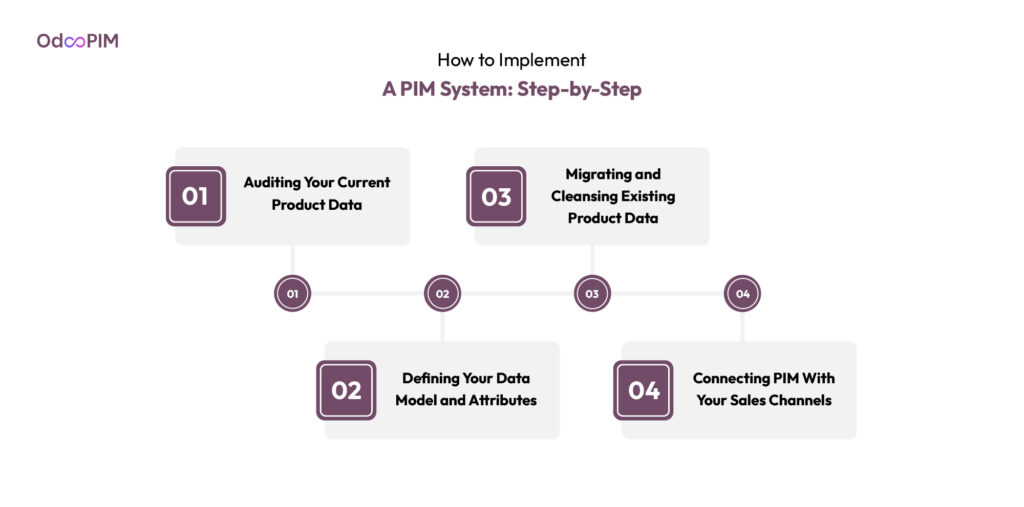
Auditing Your Current Product Data
Run a full export of your product catalog before touching any PIM software. Export every spreadsheet, every ERP extract, every supplier feed. Count missing values per field, identify which attributes are most frequently empty, and segment results by product category. Product data quality audit reveals your starting state. A fashion category might have 95% completeness on descriptions but 60% on size charts. Product data management improvement starts with knowing what is broken.
The audit also reveals process problems. Products with missing images likely indicate a broken handoff between creative and merchandising teams. Inconsistent attribute values point to missing governance. Product information management system implementation without an audit is guesswork. Document findings and prioritize fixes based on business impact. Best-selling categories first. High-error categories second. Share results with stakeholders before selecting PIM software. The audit sets realistic expectations.
Defining Your Data Model and Attributes
Your data model defines every attribute a product can have and how attributes relate to each other. A shirt has size, color, material, and care instructions. A motor has voltage, RPM, mounting pattern, and efficiency rating. Centralized product data requires a consistent model across all products. Define attribute names once. “Size” not “SIZE” or “ClothingSize.” Define allowed values. “Medium” not “M” or “Med.” Product data governance starts with the data model.
Create attribute families for different product types. Apparel attributes differ from electronics attributes. Product catalog management with a PIM system lets you define families once and apply them to hundreds of products. Test your model with real data before configuring the PIM. Does it handle your most complex product? Does it force unnecessary fields on simple products? PIM tools comparison should include data modeling flexibility. A rigid model creates more work than no model at all. Get the model right before migration.
Migrating and Cleansing Existing Product Data
Migration is not a straight copy-paste. Clean your data before loading it into the product information management system. Standardize attribute values. Convert “M,” “Med,” and “Medium” to your standard “Medium.” Fill missing required fields. Remove duplicate products. Product master data cleansing is tedious but essential. Dirty data in equals dirty data out. The PIM cannot fix what you do not clean first.
Run a pilot migration with one product category before migrating everything. Test that your data model works with real data. Validate that your cleansed data passes quality checks. Cloud PIM software typically offers import templates and data transformation tools. Use them. After pilot success, migrate in phases. One category at a time. Validate after each phase. PIM implementation best practices recommend keeping legacy systems running until the new system proves reliable. Rollback if something breaks.
Connecting PIM With Your Sales Channels
PIM integration with ERP and channel connections determine your success. List every destination: your ecommerce platform, Amazon, Google Shopping, distributor portals, retail partners. Multichannel product data syndication requires channel mapping rules. Define how your master fields become channel-specific fields. Your “product_name” maps to Amazon’s “title.” Your “short_description” maps to Amazon’s “bullet_points.” PIM for ecommerce with pre-built connectors speeds this step.
Test each connection with one product before scaling. Push a single product to your website. Verify formatting. Push to Amazon. Verify GTIN and image requirements. Product data management with a PIM system includes channel validation rules. Configure them during testing. After validation passes, schedule syndication. Real-time for price and inventory. Scheduled for descriptions and images. Monitor sync logs for failures. PIM for distributors with multiple partners requires partner-specific feeds. Set up one partner at a time. Test, validate and then automate. Integration done right turns channel distribution from a bottleneck into a background process.
Why Odoo Is the Ideal PIM System for Growing Businesses
Native ERP + PIM in One Unified Platform
Most PIM systems require separate databases and middleware to connect with your ERP. Odoo shares one database across ERP, CRM, accounting, and PIM modules. When your warehouse updates inventory in the ERP, that change appears in your product listings instantly because there is only one source of truth. PIM integration with ERP is not a bolt-on feature, it is native architecture. Product data management becomes smooth rather than a constant battle against sync delays and connector failures.
For businesses already running Odoo, switching to a standalone product information management system means paying more for less reliability. Native integration eliminates an entire category of headaches. Centralized product data flows from procurement to enrichment to distribution without middleware. PIM for ecommerce within Odoo means your store always reflects the latest pricing and inventory. The cost savings on integration labor alone often justify Odoo over standalone PIM software.
How Odoo Centralizes Your Entire Product Catalog
Odoo stores every product attribute, image, and specification in the same database as your inventory and pricing. Product master data lives alongside transactional data. Your team enriches descriptions, uploads images, and manages specifications without leaving the Odoo interface they already know. Product catalog management becomes an extension of daily operations rather than a separate system to learn and maintain. Attribute families ensure consistent data entry across product categories.
The alternative, using a standalone PIM system alongside Odoo, requires building and maintaining middleware connections. Two systems mean two databases, two sync layers, and two points of failure. Product data quality suffers when data drifts between systems. Cloud PIM software from standalone vendors adds monthly fees for connectors that Odoo provides natively. For Odoo users, centralization is automatic. Your products, inventory, and enrichment live under one roof. No integration projects and no sync debugging, just one system.
Odoo PIM Integrations: eCommerce, Amazon, WooCommerce, and More
Odoo includes native connectors to your ecommerce platform, marketplaces, and distributor portals. PIM for ecommerce within Odoo pushes product data directly to Shopify, Magento, and WooCommerce without third-party plugins. Amazon and eBay integrations handle marketplace-specific requirements like GTINs and category taxonomies. Multichannel product data syndication happens in real time or on schedule. A price change in Odoo propagates to every connected channel within minutes.
PIM for distributors benefits from Odoo’s multi-company architecture. Different partners see different pricing and product assortments from the same master catalog. PIM integration with ERP is automatic because both share one database. For businesses selling across multiple channels, Odoo eliminates the connector sprawl that plagues standalone PIM software setups. Each channel gets correctly formatted data. Your team manages one system. The platform handles distribution.
Cost-Effective PIM Without Enterprise Price Tags
Enterprise PIM systems like Salsify or inRiver start at 50,000 annually and mostly exceed
150,000 with implementation. PIM software for small business from Odoo costs a fraction of that. The PIM module adds to your existing Odoo subscription, typically 3,000 to 8,000 annually depending on user count and features. Cloud PIM software pricing from Odoo includes hosting, updates, and support. No surprise overages, no mandatory implementation partners and no six-figure commitments.
For growing businesses, Odoo offers a path from startup to scale without switching PIMs. Start with PIM software for small business pricing. Add users as your team grows and add channels as you expand. The same system works at 500 products and 50,000 products. The product information management system from Odoo includes features that standalone vendors charge extra for: ERP integration, CRM, accounting, and ecommerce. PIM tools comparison should include total cost of ownership. Odoo wins on price without sacrificing core features.

Frequently Asked Questions
1. Is a PIM System Only for Large Enterprises?
PIM software for small business options like Plytix, Sales Layer, and Odoo PIM start under $10,000 annually and scale as you grow. A small business with 500 products selling on three channels benefits as much as an enterprise with 50,000 products. Product data management problems scale with catalog size, not company revenue. Spreadsheets crack at 500 products regardless of your budget. Cloud PIM software makes implementation affordable for small teams without dedicated IT. The question is not company size. It is catalog complexity and channel count. If you have more than 500 products or sell on more than two channels, you need a PIM system.
2. How Long Does PIM Implementation Take?
Simple implementations with cloud pim software like Plytix take two to four weeks. Mid-market PIM software like Akeneo runs two to three months. Enterprise product information management system implementations with inRiver or Salsify often take six to nine months. The timeline depends on data cleanliness, integration complexity, and workflow configuration. Your messiest spreadsheet determines the timeline. Clean data before migrating. Test with one product category first. Add 50% to vendor estimates. Rushing guarantees a broken system your team abandons.
3. Can a PIM System Work Without an ERP?
PIM for ecommerce works perfectly well as a standalone system. Many small businesses run a PIM without any ERP, managing product data directly in the PIM and exporting to their store. Centralized product data in a standalone PIM still provides enrichment, validation, and syndication benefits. PIM integration with ERP is valuable but not mandatory. The trade-off is manual data entry. Without an ERP, your team must manually update inventory and pricing in the PIM. For small catalogs, this works fine. For larger catalogs, PIM integration with ERP becomes essential to avoid double entry.