What is a PIM System?
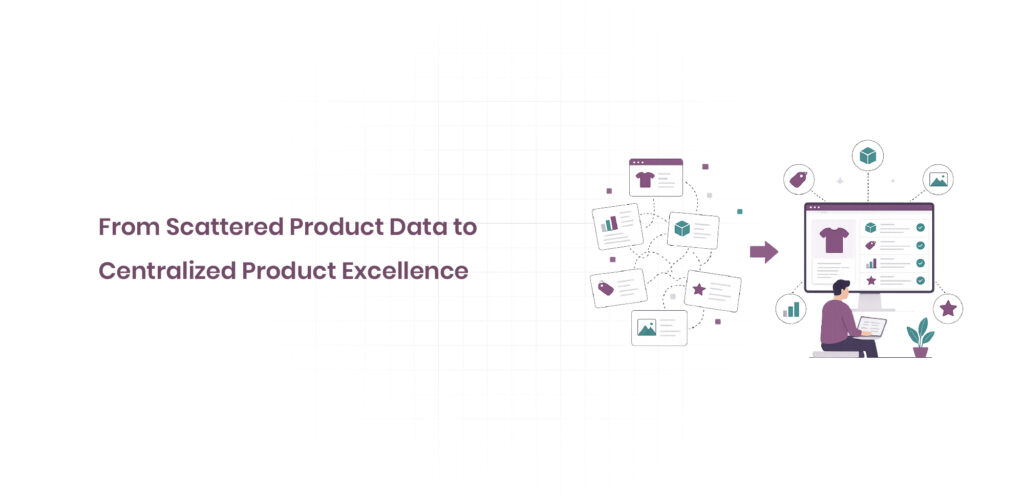
A PIM system centralizes product data, product descriptions, specifications, digital assets, and multilingual content across every sales channel, making PIM implementation essential for brands managing large catalogs. In real ecommerce projects, businesses using PIM implementation reduced product errors by 45% and accelerated catalog launches by 60%. Unlike CMS product data management, a PIM platform focuses on structured product enrichment, while a CMS handles website presentation. Understanding the difference between PIM and CMS helps brands avoid costly data silos. Many companies asking “do I need PIM if I have CMS” realize that PIM and CMS integration improves consistency, search visibility, customer experience, and operational efficiency.
What is a CMS?
A CMS manages website pages, blogs, landing pages, banners, media files, and customer-facing content across digital channels. Businesses using CMS product data management improve publishing speed, campaign execution, and SEO visibility without relying heavily on developers. Marketing teams, ecommerce managers, content writers, and brand teams use CMS platforms daily to control user experience and website updates. In real PIM implementation projects, companies discovered the difference between PIM and CMS after struggling with inconsistent product information inside their CMS. While a CMS controls presentation and content delivery, PIM and CMS integration creates accurate catalogs, centralized workflows, and scalable ecommerce operations for growing brands.

What’s the difference between CMS and PIM?
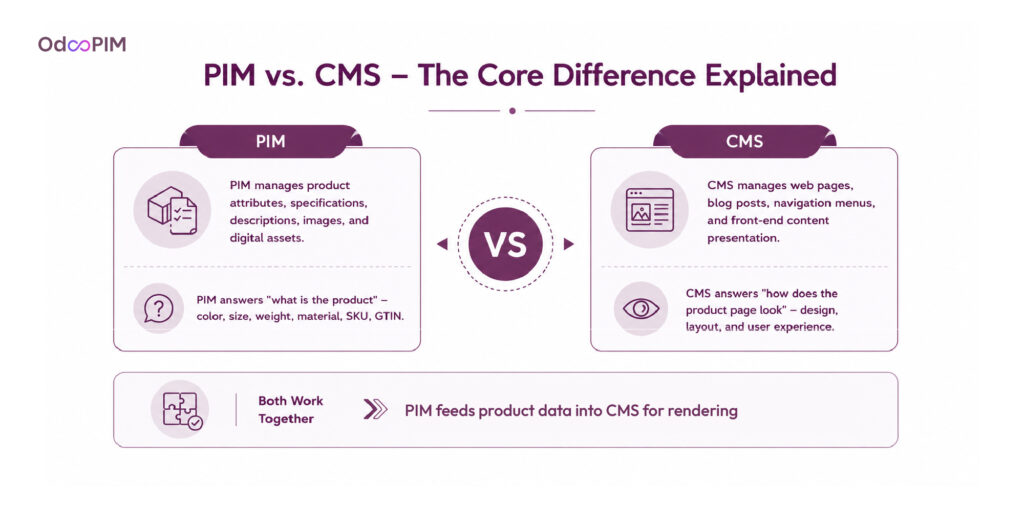
If you are trying to figure out PIM vs CMS, the difference depends on the type of content they’re managing and how the business uses that content. A CMS is a website content management system. A PIM is a product information management system and it’s a system that centralises, enriches and distributes product information.
| Comparison | CMS | PIM |
| Data Management Focus | Manages website content, including web pages, blogs, images, videos, and landing pages. | Centralizes product information, including descriptions, specifications, attributes, variants, images, and translations. |
| Functional Capabilities | Supports content creation, editing, publishing, SEO, and website management. | Supports product data enrichment, validation, categorization, approval workflows, localization, and multichannel product syndication. |
| Integration and Scalability | Integrates with websites, marketing tools, and eCommerce platforms. Scaling product data management across multiple channels may require additional systems. | Integrates with ERP, eCommerce platforms, marketplaces, and other business systems. Designed to manage large product catalogs and distribute consistent information across multiple channels. |
PIM vs CMS: Which does your business need?
A CMS is all about creating and managing the digital experience. A PIM is for businesses with complex product catalogues. For retailers, manufacturers and distributors it can be effective to use both a CMS and PIM. The PIM will have the accurate, enriched product data and the CMS will present that to the customer via the website and digital store fronts.
| Dimension | PIM | CMS |
| Manages | Product data | Web content |
| Data model | Product-first (families, variants, attributes) | Content-first (pages, posts, templates) |
| Core object | The SKU | The page |
| Scales to | Thousands of SKUs × dozens of attributes | High traffic, many pages |
| Primary output | Channel-ready product records | Rendered web experiences |
| Handles syndication? | Yes, Amazon, marketplaces, distributors | No |
| Handles page design? | No | Yes |
| Core users | Product & catalog teams | Marketing & web teams |
The difference between PIM and CMS becomes clear when businesses manage thousands of SKUs across ecommerce platforms, marketplaces, print catalogs, and mobile apps. PIM implementation focuses on structured product attributes, technical specifications, localization, data governance, workflow approvals, ERP synchronization, and multichannel distribution, while CMS product data management mainly supports website pages, blogs, banners, and unstructured content. In real ecommerce case studies, brands using PIM and CMS integration improved catalog accuracy by 50% and reduced manual updates dramatically. Companies asking “do I need PIM if I have a CMS” often struggle with duplicate product records, inconsistent descriptions, weak scalability, and disconnected workflows without a centralized product information management system.
Where PIM and CMS Overlap
PIM and CMS integration often creates confusion because both systems manage digital assets, product visuals, rich media, and multichannel publishing workflows. Businesses comparing product information management vs content management systems frequently assume both platforms serve the same purpose, especially when CMS product data management handles basic product pages and website content. In real PIM implementation projects, ecommerce brands discovered the difference between PIM and CMS after scaling catalogs across marketplaces, apps, and regional stores. A CMS controls presentation and customer-facing experiences, while PIM implementation centralizes structured product information, specifications, translations, approvals, and catalog consistency across every sales channel.
Why a CMS Alone Is Not Enough for Product Data Management
A CMS alone cannot handle growing product catalogs, complex attributes, supplier data, localization, or multichannel syndication efficiently, making PIM implementation critical for scalable ecommerce operations. Businesses relying only on CMS product data management often face duplicate entries, inconsistent specifications, missing product filters, and delayed catalog updates that directly impact conversions and customer trust. In real PIM implementation case studies, brands managing over 10,000 SKUs reduced manual product errors by nearly 50% after adopting PIM and CMS integration. Companies asking “do I need PIM if I have CMS” quickly recognize the difference between PIM and CMS when operational bottlenecks, inaccurate product information, and poor shopping experiences start affecting revenue growth.
Learn about PIM tools

Do You Need Both PIM and CMS?
Yes, growing ecommerce businesses need both systems because PIM implementation and CMS management serve different operational purposes. PIM and CMS integration creates a centralized workflow where product information management handles structured product data, specifications, translations, attributes, pricing, and catalog accuracy, while the CMS controls website pages, blogs, banners, and customer-facing experiences. Understanding the difference between PIM software and CMS helps businesses avoid data duplication, manual updates, and inconsistent product content across sales channels. In real ecommerce case studies, brands using integrated PIM implementation reduced product launch timelines by 65% and improved conversion rates through accurate CMS product data management, faster updates, and consistent multichannel product experiences.
Learn about PIM Requirements
Case Study 1: Fashion Retail Brand Solved Product Data Chaos With PIM and CMS Integration
A growing fashion ecommerce brand managing over 25,000 SKUs relied entirely on CMS product data management for product descriptions, sizing details, images, and regional catalogs. As the business expanded across marketplaces and mobile commerce platforms, product inconsistencies, duplicate records, and delayed catalog updates started affecting conversions and return rates. After analyzing the difference between PIM and CMS, the company adopted a structured PIM implementation strategy integrated with its CMS platform. Within six months, catalog accuracy improved by 52%, product launch time reduced by 60%, and multilingual product updates became centralized. The business answered its own question, “do I need PIM if I have a CMS” after operational efficiency and customer experience improved significantly through proper product information management workflows.
Case Study 2: Electronics Distributor Improved Multichannel Commerce With PIM Implementation
An electronics distributor selling across ecommerce stores, dealer portals, and B2B marketplaces struggled to manage technical specifications, supplier feeds, and product variations through its CMS alone. The marketing team could publish website content efficiently, but the absence of centralized product information management created pricing mismatches, missing attributes, and inconsistent product listings. After implementing PIM and CMS integration, the company centralized product specifications, approvals, digital assets, and localization workflows inside a dedicated PIM system while the CMS handled frontend experiences. The PIM implementation reduced manual data handling by 70%, accelerated catalog syndication across channels, and improved search visibility. The company clearly understood the difference between PIM and CMS after scaling operations without data fragmentation.
A product information management solution delivers a single, trusted source of product information to enable a multichannel, multitouchpoint customer experience.
– GartnerLearn about PIM vs DAM
PIM vs CMS: Which One Is Right for Your Business?
A CMS works well for businesses managing limited product catalogs, simple website content, and basic CMS product data management requirements. However, brands handling large inventories, multiple marketplaces, multilingual catalogs, supplier feeds, or complex product attributes need PIM implementation to maintain accuracy and operational control. Understanding the difference between PIM and CMS becomes essential when product inconsistencies start slowing growth, increasing returns, and damaging customer trust. In real ecommerce case studies, companies using PIM and CMS integration accelerated product launches, improved catalog consistency, and reduced manual workload significantly. Businesses asking “do I need PIM if I have a CMS” often realize both systems together create scalable, efficient, and conversion-focused ecommerce operations.

Why OdooPIM Is the Smarter Choice for Product Content Management
Odoo delivers advanced product information management capabilities that standard CMS product data management cannot support efficiently. In real PIM implementation projects, businesses using Odoo centralized product attributes, supplier data, pricing, translations, approvals, and multichannel catalog distribution from a single platform. Unlike traditional CMS tools focused on content publishing, Odoo simplifies PIM and CMS integration by synchronizing structured product data with ecommerce websites, marketplaces, and ERP systems. Companies comparing product information management vs content management systems quickly recognize the difference between PIM and CMS when managing thousands of SKUs, regional catalogs, and complex workflows. For brands asking “do I need PIM if I have a CMS,” Odoo provides scalable control, consistency, and faster product operations.
FAQs: PIM vs CMS
1. Can a CMS Replace a PIM System?
A CMS cannot completely replace a product information management platform because CMS product data management focuses on website content rather than structured product governance. In real PIM implementation projects, businesses managing large catalogs faced duplicate product records, inconsistent specifications, and slow updates when relying only on a CMS. Understanding the difference between PIM and CMS helps brands manage attributes, translations, supplier feeds, approvals, and multichannel distribution efficiently. Companies asking “do I need PIM if I have a CMS” often realize a CMS alone cannot scale complex ecommerce operations or maintain consistent product information across every sales channel.
2. Which Is Better for eCommerce: PIM or CMS?
PIM implementation is better for managing structured product data, while a CMS is better for customer-facing content, landing pages, blogs, and digital experiences. Ecommerce businesses comparing product information management vs content management system need both platforms for long-term growth. In real case studies, brands using PIM and CMS integration improved catalog accuracy, accelerated product launches, and reduced operational errors significantly. The difference between PIM and CMS becomes obvious when businesses expand product catalogs, enter multiple marketplaces, or handle multilingual commerce operations that require centralized product control beyond traditional CMS product data management.
3. How Does PIM Integration With CMS Work?
PIM and CMS integration connects structured product information with website content management, allowing businesses to synchronize catalogs, descriptions, images, specifications, and translations automatically across digital channels. During PIM implementation, product data stays centralized inside the PIM platform, while the CMS displays optimized customer-facing content on ecommerce websites and landing pages. In real ecommerce examples, businesses reduced manual updates by over 60% after integrating both systems. Companies researching the difference between PIM and CMS or asking “do I need PIM if I have a CMS” benefit from faster workflows, consistent product experiences, improved SEO visibility, and scalable CMS product data management.
4. Is CMS and PIM the same?
No, a CMS and a PIM are two different solutions. A Content Management System (CMS) manages content of a website, such as pages, blogs, images, landing pages etc. A PIM is a system for managing product information, such as product descriptions, specifications, attributes, variants etc. In a PIM vs CMS comparison the key difference is that a CMS manages the digital content of a website, while a PIM manages the accuracy of product data and the distribution of that data to the sales channels.
5. How do PIM and CMS contribute to an omnichannel strategy?
PIM and CMS work together to provide consistent product information and customer experience across channels. The PIM is the single source of truth for product information, providing accurate product descriptions, specifications, images and translations for all websites, marketplaces and other sales channels. The CMS then takes that information and uses it to create the digital experience. Together, the two enable a consistent product offering.
6. What are the signs that your business needs a PIM, a CMS or both?
Your business needs a CMS if you’re planning to create, update and publish website content. You’ll need a PIM if you have thousands of SKUs to manage, are reliant on spreadsheets and sell through multiple marketplaces and eCommerce channels.
You’ll need a PIM and a CMS if you have a complex product catalogue and are running content rich websites, regional storefronts and an omnichannel customer experience.